Skip to content
JScheper.com
JScheper.com

BizApps, Powerplatform and AI

  • Home
  • Blog
  • Contact
JScheper.com

BizApps, Powerplatform and AI

updating data using Excel

Clever or not? Updating data using Excel

Posted on May 15, 2025May 14, 2025 By Jeroen Scheper

One of the most popular tools that people use and find convenient is Microsoft Excel. I have been part of so many conversations where we had discussions about being able to export to Excel (or not). Updating data using Excel can be tricky, if you don’t use it for the right purposes, if you ask me.

The reason why I believe this is tricky is mainly based on the criteria:

How much time is in between the moment of export creation and the likelyhood of importing back and what are the chances that the record gets updated in the meantime

Use case: updating data using Excel

Let me explain this via a use case where I will be updating data using Excel, and in my example, it will be opportunity data.

updating data using excel

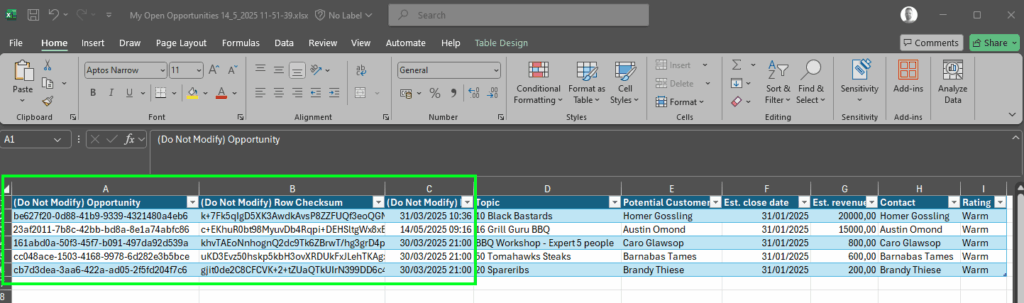
The first step is to export the data. From the ribbon, select the three dots and select Export to Excel. This will download the file to your local drive. What most people won’t see is that columns A, B, and C are hidden.

  • A = the GUID of the record, which is the unique identifier
  • B = Row Checksum is a unique hash code for the record
  • C = Data Modified

Now let’s update the Est Close Date in the Excel file for all records to be the end of this month, the 31st of May 2025.

The next step will be to import the data back again, select the three dots > Import from Excel, and upload the file you updated. As you can see below, all the records are updated except for one.
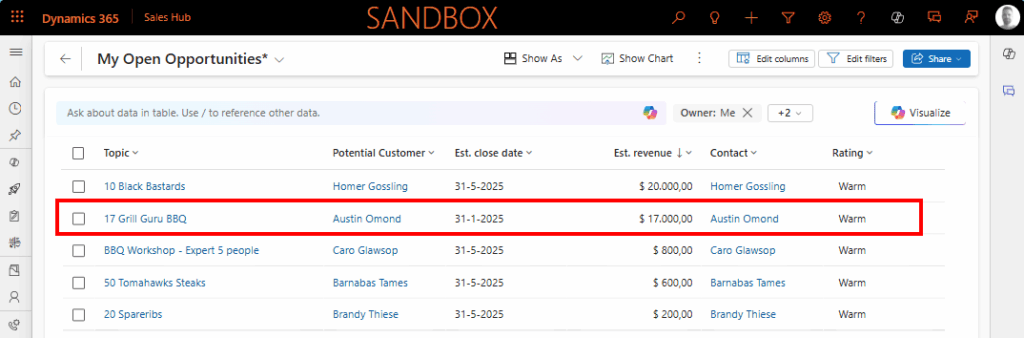
The reason why this was not updated is simple, and immediately highlights the issue. After the records were exported to Excel, I made a change to the opportunity record, and you can see I made two changes:

  • Changed the Topic to be 17 Grill Guru BBQ
  • Changed the Est. Revenue to be 17000

When checking the data imports file, within Power Platform Admin Settings > Data Management > Imports and navigating to the Failures tab, you also see that that is the specific reason why that record did not update.
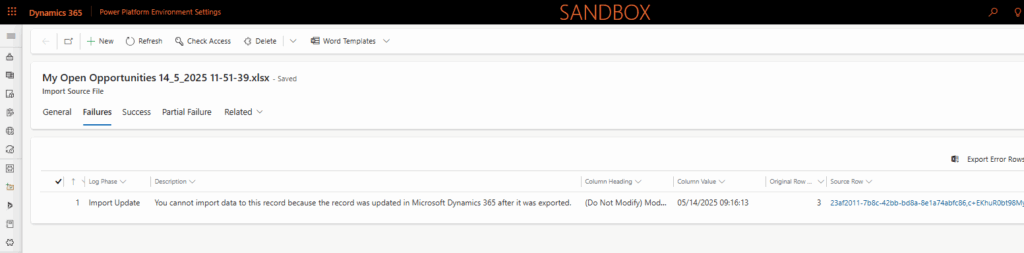
So the question is, how did the data import process know it was changed? The unique hash code. Just to show what happens, I have created the exact same export after I made the change to the opportunity record. As you can see below, the unique hash code has changed for that specific record.
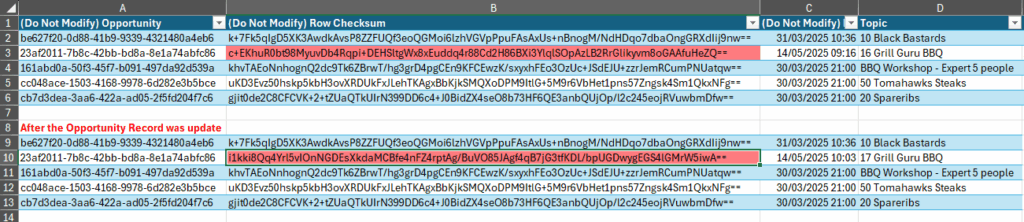
So, to conclude on updating data using Excel, if you have data that is very likely taking some time to be imported back into the system, and there are high chances that the records get updated in the meantime, you should probably look for alternatives to avoid getting frustrated and to do manual (re)work.

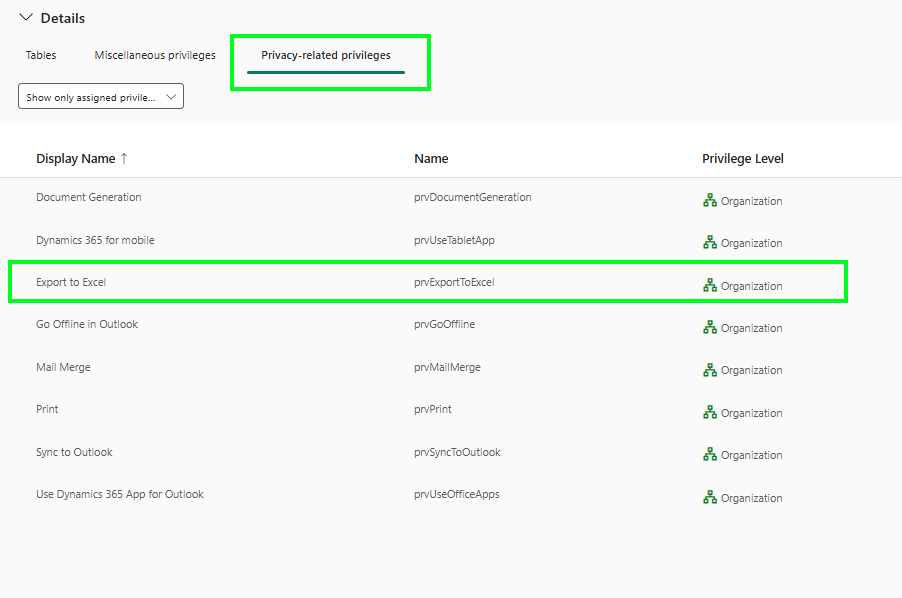
Privilege: Export to Excel

Within the Power Platform, Export to Excel is being managed by a single property on a security role, and that is something I hope will change in the future so you have more control over which tables are even allowed to be exported, not just based on the tables you have access to via your security role.
Model-driven Apps Dataverse Reporting Export to ExcelPower platform Admin Settings

Post navigation

Previous post
Next post

Related Posts

Power BI Visualize your view with Power BI

Visualize your view with Power BI

Posted on November 6, 2024November 6, 2024

Sometimes you stumble upon a feature that makes you think “that is pretty cool 😎”. There are plenty of ways of interrogating sales data within Dynamics 365 which I will touch in a bit, but there is also an option that I was not aware of is to visualize your…

Read More
Sales lead duplicate detection feature

Improve your lead data using the enhanced lead duplicate detection feature

Posted on January 28, 2026January 28, 2026

Data quality is probably one of the biggest issues that companies are struggling with. The enhanced lead duplicate detection feature is something you should definitely look into in order to get better data quality. Most people are familiar with the traditional duplication rule that you can set up as an…

Read More
Model-driven Apps Sublime way of collaborating

Sublime way of collaborating on a record in model-driven apps

Posted on July 2, 2024July 17, 2024

Sometimes you come across something that you think “Ah that is kind of cool”. I had such a moment this week where I came across something around collaboration on a record within a model-driven app. It is already there for a couple of months based on what I can see,…

Read More

Leave a Reply Cancel reply

Your email address will not be published. Required fields are marked *

ABOUT ME

  • LinkedIn
  • Mail
  • GitHub
  • YouTube
"BizApps and PowerPlatform dude with a passion for AI, sitting relaxt in his black shirt on a bounty white beach with palm trees, a azure blue ocean in the background and enjoying a good coffee "

~GenAI - DALL.E 3 and GPT 3.5

Subscribe

Please wait...

Thank you for subscribing!

Search

Categories

  • Agents
  • AI Builder
  • AI Prompting
  • Artificial Intelligence
  • Copilot
  • Copilot Studio
  • Customer Insights
  • Customer Service
  • Dataverse
  • Field Services
  • Generative AI
  • Model-driven Apps
  • Personal Development
  • Power Apps
  • Power Automate
  • Power BI
  • Power Platform
  • Reporting
  • Sales
  • SharePoint

Archive

  • June 2026
  • May 2026
  • March 2026
  • February 2026
  • January 2026
  • December 2025
  • November 2025
  • October 2025
  • August 2025
  • July 2025
  • June 2025
  • May 2025
  • April 2025
  • March 2025
  • February 2025
  • January 2025
  • December 2024
  • November 2024
  • October 2024
  • September 2024
  • August 2024
  • July 2024
  • June 2024
  • May 2024
© 2024 - All rights reserved | Jeroen Scheper | Privacy Policy