Skip to content
JScheper.com
JScheper.com

BizApps, Powerplatform and AI

  • Home
  • Blog
  • Contact
JScheper.com

BizApps, Powerplatform and AI

jump bar in the view

Where is my jump bar in the view?

Posted on December 5, 2024December 10, 2024 By Jeroen Scheper

A few (Wave) updates back, I can’t remember when exactly, when you were navigating to the different menu items you would get a view with for example active accounts, but at the bottom you would see the jump bar in the view. This jump bar was very useful if you asked me because it allowed you to navigate and or filter the list of records that you have. In case you have missed this jump bar, I will help you to get it back.
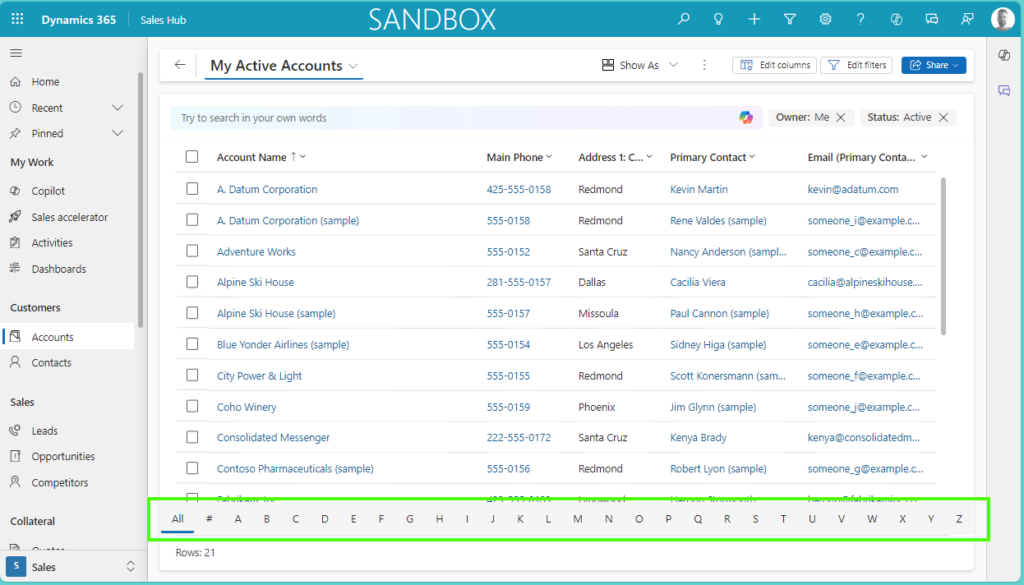
How do you get the jump bar in the view back?

In order to get the jump bar in the view back, you need to follow the next steps:

  • Create a solution and add the Table where you want to update this for
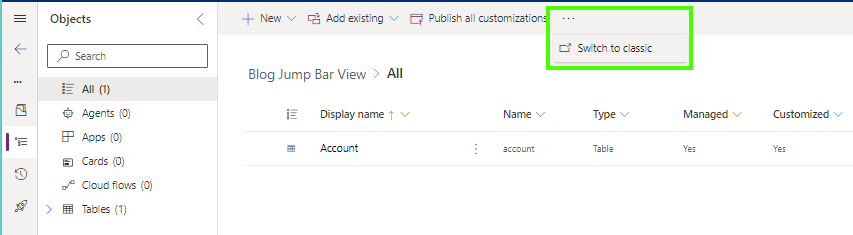
  • The painful step in this process is that as far as I am aware you can only update this in the Classic UI
  • So if you are always working still in the Classic UI you can ignore this step 😎, otherwise select the Three dots > Switch to classic
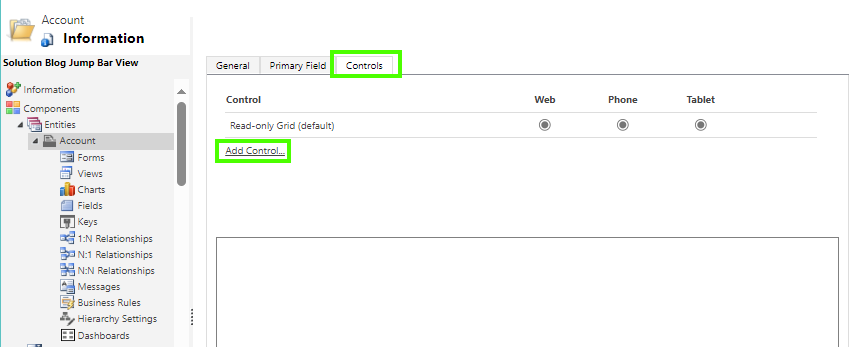
  • Open the Table and navigate to Controls
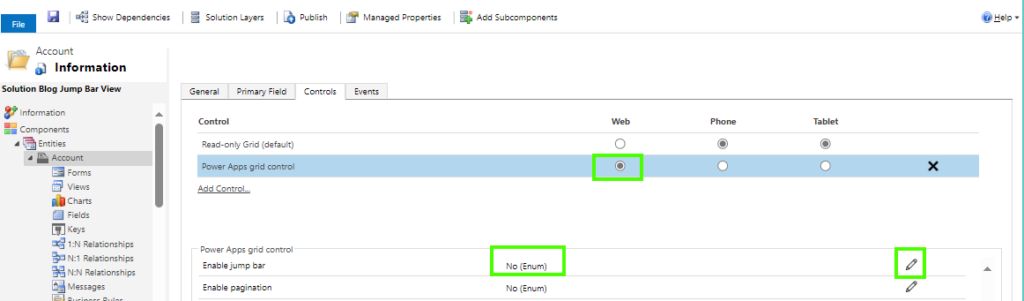
  • Select Add Control..
  • Find the Power App Grid Control from the list and select Add
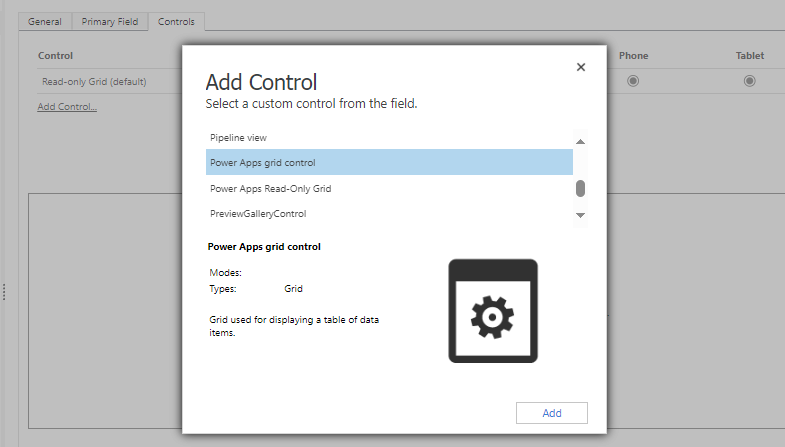
  • Select where you want to be able to set this up for, in my case only for the Web
  • Find the Enable jump bar control and select Edit
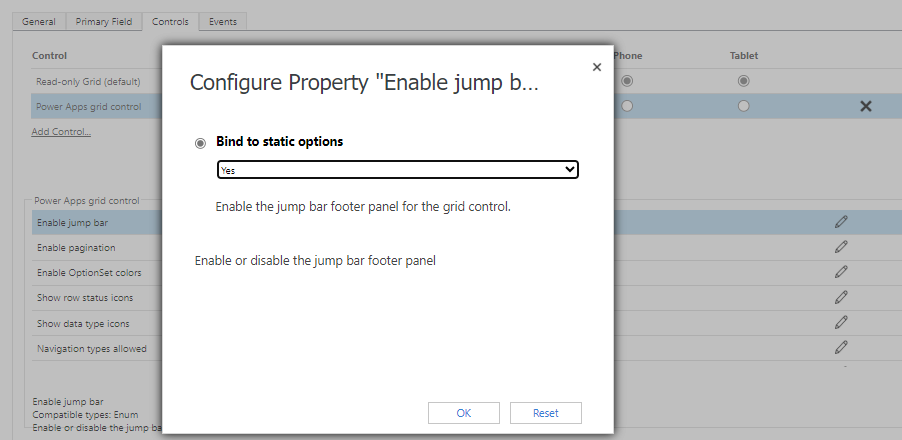
  • Set the Bind to static options to Yes and select OK.
  • Save and Publish your changes
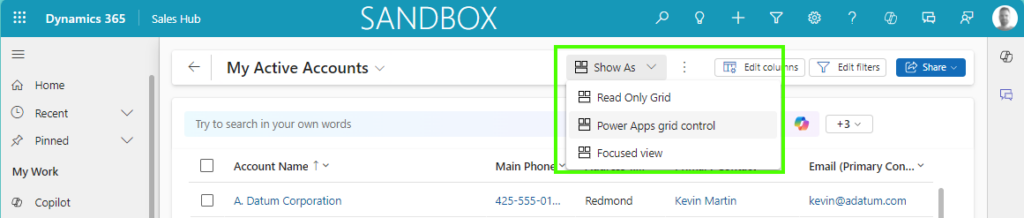
  • The last step is to navigate to your table, in my example the Account overview, and make sure the new Power Apps grid control is selected. Once selected it will remember the next time what control was selected for that table which is very helpful of course.
Model-driven Apps Customer Insights Customer Service Field Services Sales jump barpower apps grid controlviews

Post navigation

Previous post
Next post

Related Posts

Sales Auditing Business Process Flow Stage movements

From Stage Changes to Strategic Insights: Auditing Business Process Flow Movements

Posted on March 10, 2026March 10, 2026

You probably recognize this: when using a Business Process Flow, the standard functionality allows you to see how many minutes/hours days the process is active. Have you ever thought about auditing Business Process Flow movements? When you have a business process flow that aligns with your process, when auditing business…

Read More
Model-driven Apps Sublime way of collaborating

Sublime way of collaborating on a record in model-driven apps

Posted on July 2, 2024July 17, 2024

Sometimes you come across something that you think “Ah that is kind of cool”. I had such a moment this week where I came across something around collaboration on a record within a model-driven app. It is already there for a couple of months based on what I can see,…

Read More
Sales Adding Goals in bulk

Adding Goals in bulk, simple and easy!

Posted on November 14, 2025November 14, 2025

In my previous blog post, I wrote about goal management in general (link to article here). The post explains how goal management works and how to configure it yourself. Adding goals in bulk is one of the gaps I noticed while I was looking into this feature. Yes, there is…

Read More

Leave a Reply Cancel reply

Your email address will not be published. Required fields are marked *

ABOUT ME

  • LinkedIn
  • Mail
  • GitHub
  • YouTube
"BizApps and PowerPlatform dude with a passion for AI, sitting relaxt in his black shirt on a bounty white beach with palm trees, a azure blue ocean in the background and enjoying a good coffee "

~GenAI - DALL.E 3 and GPT 3.5

Subscribe

Please wait...

Thank you for subscribing!

Search

Categories

  • Agents
  • AI Builder
  • AI Prompting
  • Artificial Intelligence
  • Copilot
  • Copilot Studio
  • Customer Insights
  • Customer Service
  • Dataverse
  • Field Services
  • Generative AI
  • Model-driven Apps
  • Personal Development
  • Power Apps
  • Power Automate
  • Power BI
  • Power Platform
  • Reporting
  • Sales
  • SharePoint

Archive

  • March 2026
  • February 2026
  • January 2026
  • December 2025
  • November 2025
  • October 2025
  • August 2025
  • July 2025
  • June 2025
  • May 2025
  • April 2025
  • March 2025
  • February 2025
  • January 2025
  • December 2024
  • November 2024
  • October 2024
  • September 2024
  • August 2024
  • July 2024
  • June 2024
  • May 2024
© 2024 - All rights reserved | Jeroen Scheper | Privacy Policy