Skip to content
JScheper.com
JScheper.com

BizApps, Powerplatform and AI

  • Home
  • Blog
  • Contact
JScheper.com

BizApps, Powerplatform and AI

Use colors for choice columns in your views

Posted on December 11, 2024December 10, 2024 By Jeroen Scheper

Last week I posted something about the Power App Grid Control that allows you to get the jump bar back in your views (read the full post here). One of the other cool settings on this control is it allows you to use colors for choice columns in your views, which is if you ask me giving a bit more shininess to the overview (not sure if that word exists 🤣)
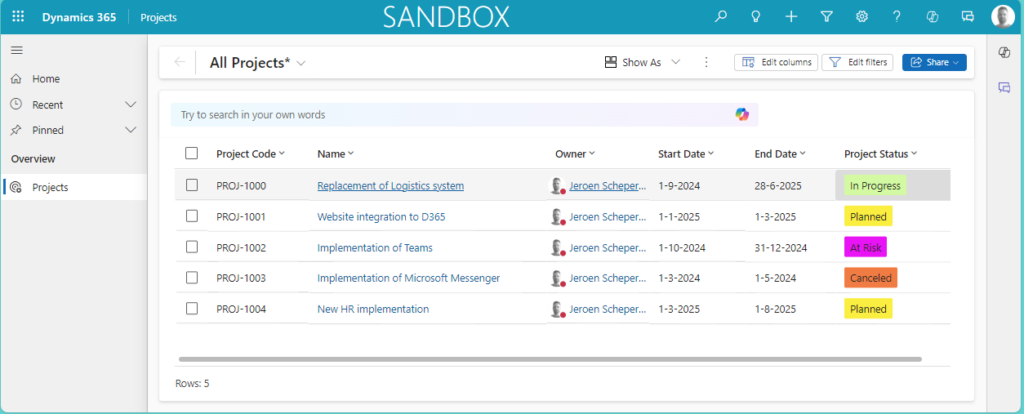
use colors for choice columns

How can you use colors for choice columns?

In order to demonstrate how this works I have created a simple table called Projects. In this table I created a column of type choice called: Project Status.

In addition to the label, I now also set the color for each of the values as you can see in the image below.
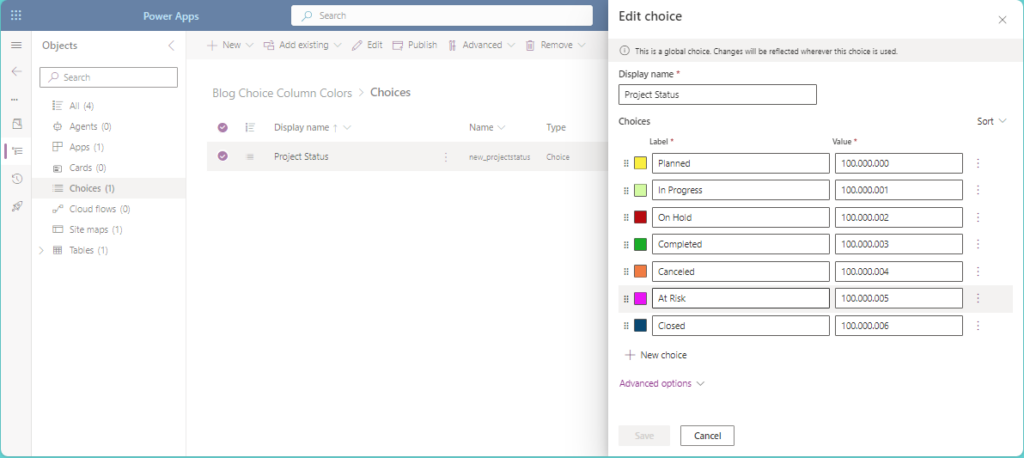
The next step is to make sure the Power Apps grid control is set for the Projects table. Follow the next steps:

  • In my example, I have created a solution with the Projects table in it as a start
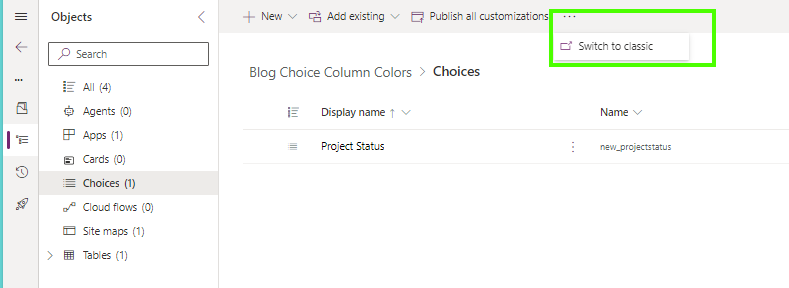
  • The painful step in this process is that as far as I am aware you can only update this in the Classic UI
  • So if you are always working still in the Classic UI you can ignore this step, otherwise select the Three dots > Switch to classic
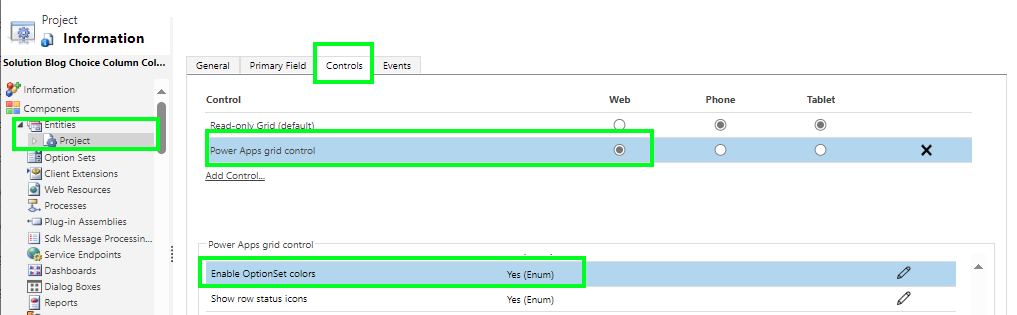
  • Open the Table and navigate to Controls
  • Select Add Control..
  • Find the Power App Grid Control and make sure this is being set for the Web
  • Find the Enable OptionSet Colors and update the setting to Yes
  • Save and Publish your changes
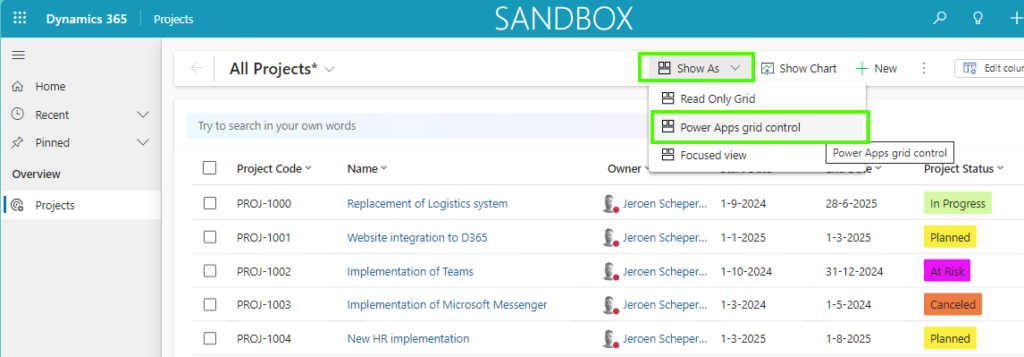
  • The last step is to navigate to your table, in my scenario the Project, and make sure the new Power Apps grid control is selected from the Show As dropdown. Once selected it will remember the next time what control was selected for that table.
Model-driven Apps Customer Insights Customer Service Field Services Sales colors in viewspower apps grid controlviews

Post navigation

Previous post
Next post

Related Posts

Sales Work assignment to automate assignments

Use Work Assignment to automate assignments

Posted on August 28, 2024August 27, 2024

Another great feature that is released within the Wave 2 2024 Release is the Work Assignment feature. This feature allows you to automate the process of leads and opportunities assignments based on different criteria. This can be a great way to assign high-priority leads, high-value opportunities, or perhaps opportunities from…

Read More
Copilot 360-Degree view of an Account

The 360-degree view of an account with AI-generated summary

Posted on October 31, 2024October 31, 2024

One of the features that was part of the 2024 Wave 2 Release is the 360-degree view of an account with an AI-generated summary. The cool thing about this feature is that it collects valuable information (in some cases configurable) and shows this in a nice and efficient way. The…

Read More
Model-driven Apps email address validation columns

Deprecation of smart email address validation

Posted on June 12, 2025June 11, 2025

Microsoft shared that the email address validation for columns will be deprecated as of the 31st of July 2025. This feature is still in preview as of today, and based on what I found, this was introduced in Q3 or Q4 of 2023 and has been in preview since then….

Read More

Leave a Reply Cancel reply

Your email address will not be published. Required fields are marked *

ABOUT ME

  • LinkedIn
  • Mail
  • GitHub
  • YouTube
"BizApps and PowerPlatform dude with a passion for AI, sitting relaxt in his black shirt on a bounty white beach with palm trees, a azure blue ocean in the background and enjoying a good coffee "

~GenAI - DALL.E 3 and GPT 3.5

Subscribe

Please wait...

Thank you for subscribing!

Search

Categories

  • Agents
  • AI Builder
  • AI Prompting
  • Artificial Intelligence
  • Copilot
  • Copilot Studio
  • Customer Insights
  • Customer Service
  • Dataverse
  • Field Services
  • Generative AI
  • Model-driven Apps
  • Personal Development
  • Power Apps
  • Power Automate
  • Power BI
  • Power Platform
  • Reporting
  • Sales
  • SharePoint

Archive

  • June 2026
  • May 2026
  • March 2026
  • February 2026
  • January 2026
  • December 2025
  • November 2025
  • October 2025
  • August 2025
  • July 2025
  • June 2025
  • May 2025
  • April 2025
  • March 2025
  • February 2025
  • January 2025
  • December 2024
  • November 2024
  • October 2024
  • September 2024
  • August 2024
  • July 2024
  • June 2024
  • May 2024
© 2024 - All rights reserved | Jeroen Scheper | Privacy Policy