Skip to content
JScheper.com
JScheper.com

BizApps, Powerplatform and AI

  • Home
  • Blog
  • Contact
JScheper.com

BizApps, Powerplatform and AI

create Word and Excel templates

Smooth UI or not? Create Word and Excel templates

Posted on February 26, 2025February 25, 2025 By Jeroen Scheper

Microsoft has transformed the settings from the classic user-interface settings to a new way of managing the settings via the Power Platform Admin Setting app. This week I faced a setting where I believe unfortunately the classic interface has more advantages: create Word and Excel templates.

Most people will remember the following popup that you can find in Settings > Templates > Document Templates. This would allow you to design your own Word or Excel templates that you can then use for example to design your Quote document.

You would select either Excel Template or Word Template and the entity that the template is for.

create Word and Excel templates

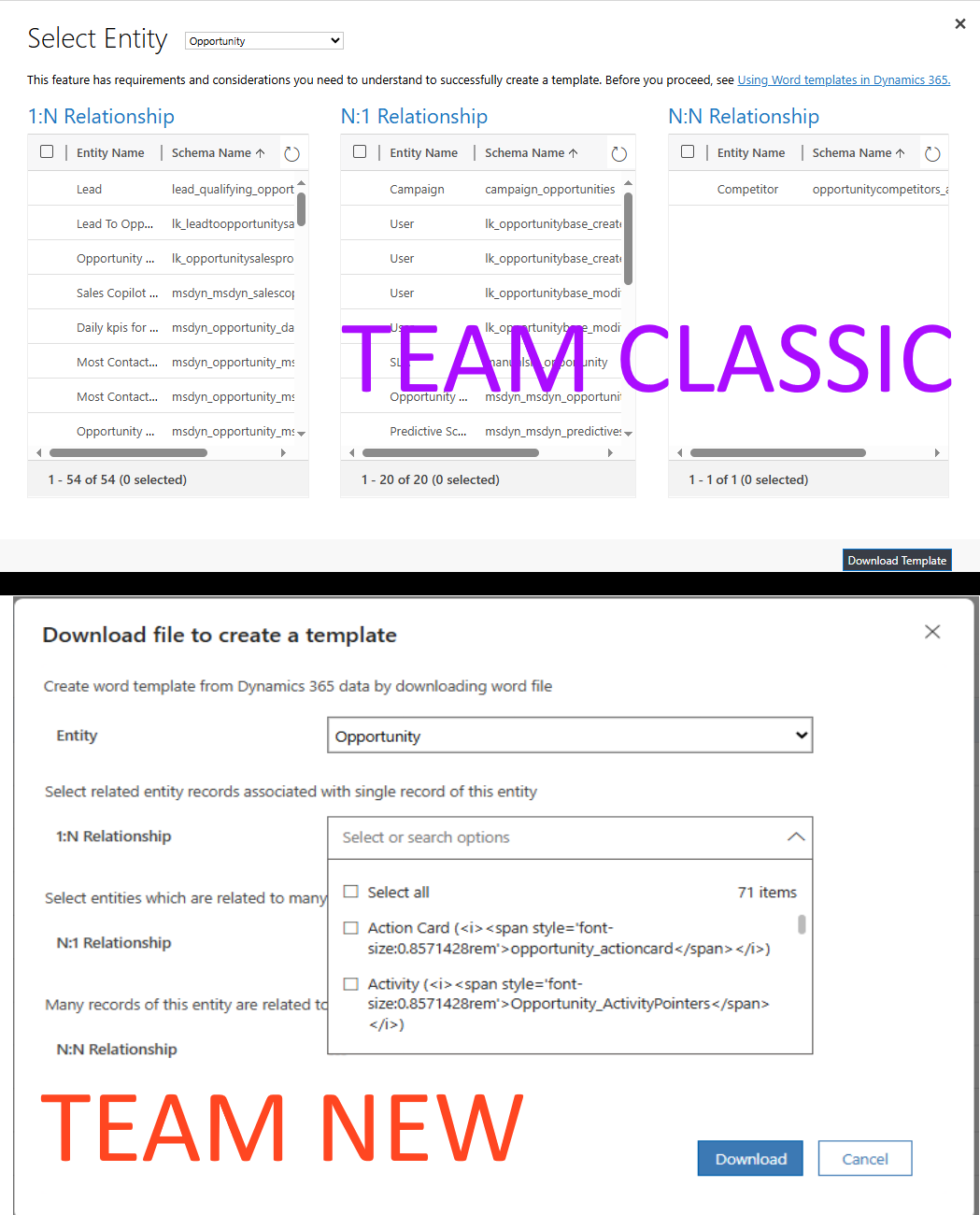
In the next step, once you select Select Entity, you will see an overview of the relationships that you want to make available in your template in order to design the document. The benefit of this form if you ask me, is that it gives you a nice overview of all relations.

New UI to create Word and Excel templates

As I mentioned at the beginning of the post, a lot, perhaps all settings, are now managed via the Power Platform Admin Settings app. So when navigating to the Business section of the menu, you can find the Templates there. So this is now the place to create Word and Excel templates 😎

Unfortunately, the Document templates are not at the level yet for a couple of reasons, if you ask me.

1. Initiation of new templates
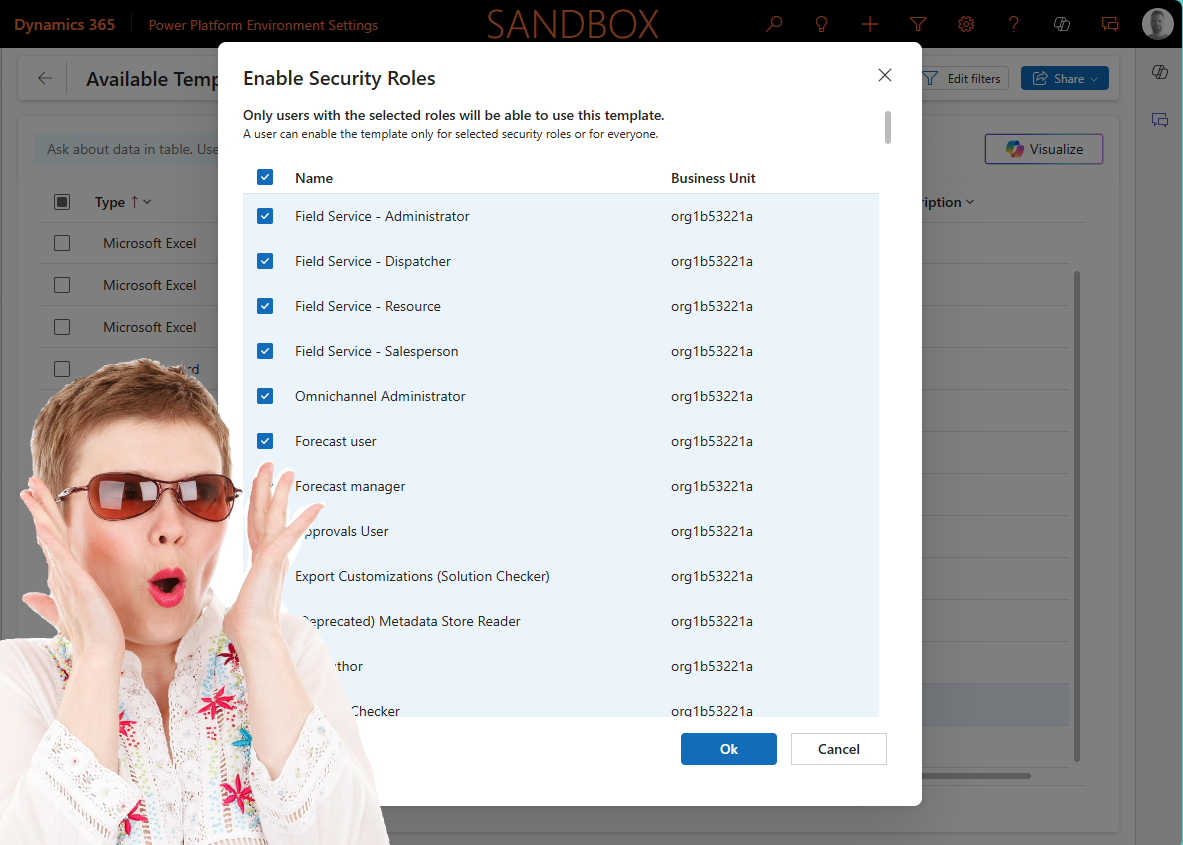
The menu is not working as expected, at least according to my expectations 🤣 When you have selected the Document templates you get the overview with the templates available. When you select + New you will see only the Download Excel Template available and no option for Word 😲

The funny thing is when you select any record in the view of templates, the option to Download Word Template is now available

2. Options contain HTML code
The new user interface allows you to select the Entity as the first step, which is the same as in the classic user interface. But when checking the relationships there are now dropdowns. As you can see in the image below the options do contain HTML code in it.

3. User experience
The last thing thing is causing me to vote for Team Classic is the user experience. When you want to include all relationships you can still use the Select All for all relationships so that is still the same. If you have some hands-on experience you probably know it is good to only choose the relationships that are needed because of:

  • performance
  • lower risk of users selecting the wrong relationships

Now trying to analyse for example 71 items in a dropdown and selecting the individual items that you want to be included in a template is a bit painful in this experience. So hopefully Microsoft will fix the first two issues and will work on the user experience of the last form so it will be easier to select items in longer lists.
Model-driven Apps Reporting Document templatesExcel TemplatesPower platform Admin SettingsWord Templates

Post navigation

Previous post
Next post

Related Posts

Sales

Make Sales Fun again, How to configure your own Gamification

Posted on December 10, 2025December 10, 2025

Making sales fun again and driving adoption, that was, in essence, what the gamification module was all about. Some of you can perhaps still remember the classic gamification module. Now it is time to configure your own gamification via some simple customizations. In this blog, I would like to demonstrate…

Read More
AI Prompting AI Insight Cards for tables

Using AI record summary for tables

Posted on January 28, 2025January 27, 2025

One of the things that was just released in Public Preview is the AI record summary for tables (link to release plan). The cool thing about this feature is that it allows you to create your own custom AI Prompt, which will then be used to display the Copilot summary…

Read More
SharePoint Single SharePoint document storage

Single SharePoint document storage place across sales process

Posted on July 23, 2025July 21, 2025

Let’s start with the fact that I am not a SharePoint “Guru,” so I still need to learn a lot in that area. I wanted to have a single SharePoint document storage place for the sales process of Padel Vamos. The difficulties I found when working with SharePoint are the…

Read More

Leave a Reply Cancel reply

Your email address will not be published. Required fields are marked *

ABOUT ME

  • LinkedIn
  • Mail
  • GitHub
  • YouTube
"BizApps and PowerPlatform dude with a passion for AI, sitting relaxt in his black shirt on a bounty white beach with palm trees, a azure blue ocean in the background and enjoying a good coffee "

~GenAI - DALL.E 3 and GPT 3.5

Subscribe

Please wait...

Thank you for subscribing!

Search

Categories

  • Agents
  • AI Builder
  • AI Prompting
  • Artificial Intelligence
  • Copilot
  • Copilot Studio
  • Customer Insights
  • Customer Service
  • Dataverse
  • Field Services
  • Generative AI
  • Model-driven Apps
  • Personal Development
  • Power Apps
  • Power Automate
  • Power BI
  • Power Platform
  • Reporting
  • Sales
  • SharePoint

Archive

  • March 2026
  • February 2026
  • January 2026
  • December 2025
  • November 2025
  • October 2025
  • August 2025
  • July 2025
  • June 2025
  • May 2025
  • April 2025
  • March 2025
  • February 2025
  • January 2025
  • December 2024
  • November 2024
  • October 2024
  • September 2024
  • August 2024
  • July 2024
  • June 2024
  • May 2024
© 2024 - All rights reserved | Jeroen Scheper | Privacy Policy