Skip to content
JScheper.com
JScheper.com

BizApps, Powerplatform and AI

  • Home
  • Blog
  • Contact
JScheper.com

BizApps, Powerplatform and AI

Hide a choice column value

Finally there, hide a choice column value, or not?

Posted on April 2, 2025April 2, 2025 By Jeroen Scheper

Some of you still probably know them as option sets, but nowadays they are called Choice columns, and Microsoft has recently released functionality to hide the choice column values. But the question is, is it working like we think it is or not? I have seen some threads on the community forum where initial responses were that it is not designed for what we think it should do (blog link).

Personally speaking, I believe this was on lots of people their lists when it comes to enhancements that would make maintenance a lot easier, so excited about this!

For a long time, the Choice Columns, also known as Option Sets, were not something you could easily manage. Once they were there, it was hard to get rid of. Every time there was a use-case to create some sort of “dropdown”, I always thought, shall I go for the Choice Columns or the Table (Entity)?

Over the years, I have seen different “resolutions” for this, things like:

  • Prefix the value with DNU and put the original value behind it
  • Using JavaScript to hide elements
Hide a choice column value

How to hide a choice column value?

To hide a Choice column value is very simple to do; follow the next steps:

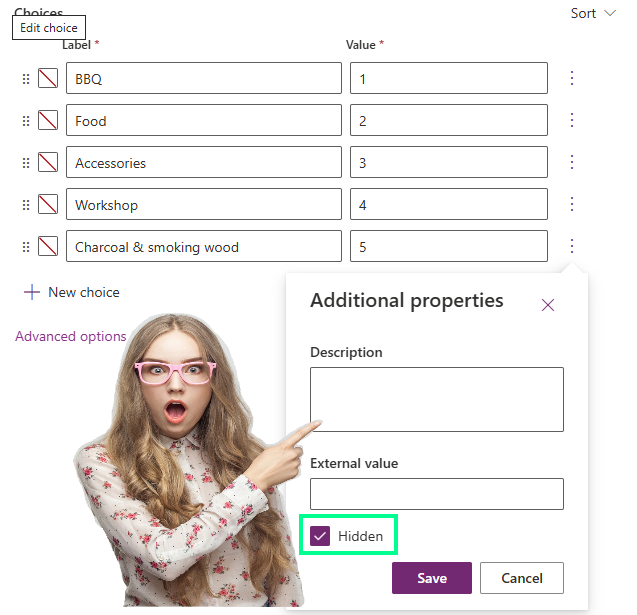
  • Open the Choice column that you would like to update. in the example below, I would like to hide the “Charcoal & smoking wood” option from the Inquiry Type Choice column
  • Select behind the Charcoal & smoking wood option, the three dots > Additional properties
  • Select Hide and press Save

When the column and table are published, and when you now open the choice column, you will see that the “Charcoal & smoking wood” option is now not available.

What happens with the data once an option is hidden?

Once you have decided to hide an option, let’s use the “Charcoal & smoking wood“; the question is, though, what happens with the existing data? As you can see, the option is selected and disabled, so this would allow you to change it to one of the options that are available.

Intentional or not, for me, this is exactly what a lot of people were waiting for to have a solution that is:

  • Manageable, so no difficult scripting is needed
  • Better user experience, so no DNU or other variants appear in the dropdown

Dataverse Model-driven Apps Choice columns

Post navigation

Previous post
Next post

Related Posts

Copilot Copilot to visualize data in views

Using Copilot to visualize data in views

Posted on March 5, 2025February 25, 2025

Another promising preview feature that has been released recently, now you can use Copilot to visualize data in views 😍. Based on the data and columns in your views, Copilot can now generate charts for you. These charts are, same as in the traditional charts, interactive which therefore allows you…

Read More
Power Apps enable column reordering in views Power App Grid Control

Power Apps Grid Control: Enable column reordering in views

Posted on January 15, 2025January 15, 2025

Recently I have posted a few things about the Power Apps Grid Control and how you can enable the jump bar (here) or use colors in your choice columns (here) to make it more user-friendly or look nicer. When using the Power Apps Grid Control, one of the things that…

Read More
Model-driven Apps hide system views

Hide system views to tailor your user experience

Posted on September 11, 2024September 6, 2024

Do you find it difficult to find the system views in the long lists of views available for certain tables? Yes, you were able to set a default of course, but now you do have the option to hide system views when enabling this feature. When looking at the Opportunity…

Read More

Comment

  1. Megan Walker says:
    April 2, 2025 at 12:14 pm

    Hooray! This is awesome. Definitely something that always comes up so good that we finally have an out of the box solution!

    Reply

Leave a Reply Cancel reply

Your email address will not be published. Required fields are marked *

ABOUT ME

  • LinkedIn
  • Mail
  • GitHub
  • YouTube
"BizApps and PowerPlatform dude with a passion for AI, sitting relaxt in his black shirt on a bounty white beach with palm trees, a azure blue ocean in the background and enjoying a good coffee "

~GenAI - DALL.E 3 and GPT 3.5

Subscribe

Please wait...

Thank you for subscribing!

Search

Categories

  • Agents
  • AI Builder
  • AI Prompting
  • Artificial Intelligence
  • Copilot
  • Copilot Studio
  • Customer Insights
  • Customer Service
  • Dataverse
  • Field Services
  • Generative AI
  • Model-driven Apps
  • Personal Development
  • Power Apps
  • Power Automate
  • Power BI
  • Power Platform
  • Reporting
  • Sales
  • SharePoint

Archive

  • June 2026
  • May 2026
  • March 2026
  • February 2026
  • January 2026
  • December 2025
  • November 2025
  • October 2025
  • August 2025
  • July 2025
  • June 2025
  • May 2025
  • April 2025
  • March 2025
  • February 2025
  • January 2025
  • December 2024
  • November 2024
  • October 2024
  • September 2024
  • August 2024
  • July 2024
  • June 2024
  • May 2024
© 2024 - All rights reserved | Jeroen Scheper | Privacy Policy