Skip to content
JScheper.com
JScheper.com

BizApps, Powerplatform and AI

  • Home
  • Blog
  • Contact
JScheper.com

BizApps, Powerplatform and AI

email address validation columns

Deprecation of smart email address validation

Posted on June 12, 2025June 11, 2025 By Jeroen Scheper

Microsoft shared that the email address validation for columns will be deprecated as of the 31st of July 2025. This feature is still in preview as of today, and based on what I found, this was introduced in Q3 or Q4 of 2023 and has been in preview since then. The smart email address validation would work for:

  • Only works for model-driven apps
  • It acts as a notification and does not block the user
  • Text columns with the Format Type = Email
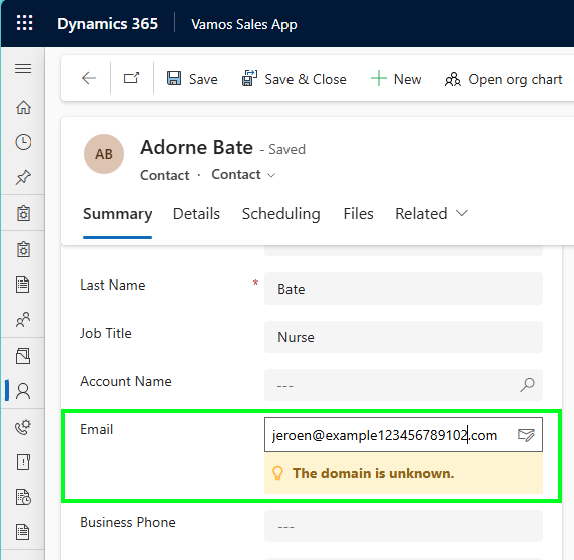
smart email address validation for columns

The checks that are part of this smart email address validation are as follows, and this is directly coming from the Microsoft website (link here):

  • Incorrect syntax: For example, an address that doesn’t contain both a username and an email domain.
  • Disposable domain: An address that contains a known disposable or temporary email domain.
  • Test or spam email addresses. An address that contains known indicators of a test or spam address in the email header or metadata, IP address, HTML code of the email, and email content and formatting.
  • Expired email addresses: This is an email account that has expired and can no longer receive or send email.
  • Emails that bounce back: This is an address that can’t receive a message for any reason other than being expired.

Personally speaking, I do not have much experience myself to determine if this feature was a good or bad thing to have. If you do have more experience with this or have a better understanding of why it is a good or bad thing that this is going to be deprecated, then feel free to drop a comment.

Enable/Disable smart email address validation for columns

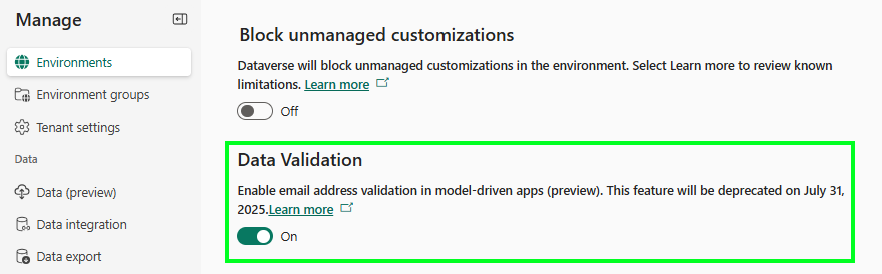
In order to enable or disable the setting for email address validation for columns, you need to:

  • Open the Power Platform Admin Center
  • Navigate to Environments
  • Select the environment where you want to enable this for
  • Select Settings
  • Navigate to the Data Validation section
  • Enable/Disable the Enable email address validation in model-driven apps (preview)
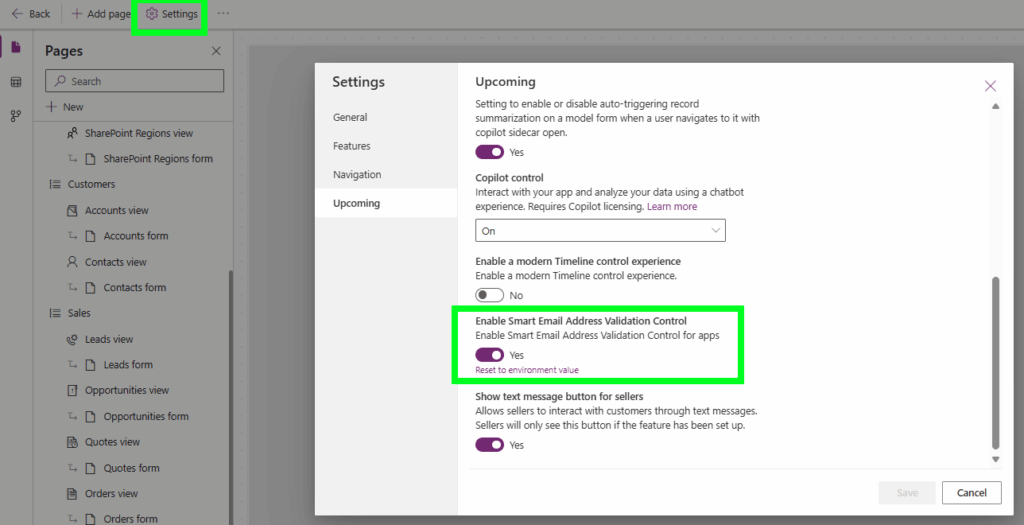
On the model-driven app level, you can enable/disable this as well by:

  • Open the model-driven app
  • Select Settings
  • Navigate to the Upcoming section
  • Enable/Disable the Enable Smart Email Address Validation Control
Model-driven Apps Power Apps deprecatiedemail address validationsmart email validation

Post navigation

Previous post
Next post

Related Posts

Power Automate workflow approvals using power automate

Get your quote approved with workflow approvals using Power Automate

Posted on October 16, 2024October 11, 2024

Inspired by a number of great people in the community who wrote about Workflow Approvals using Power Automate in the past I wanted to use this in a prototype based on requests that I have seen in the field. This idea is translated into the use case I have used…

Read More
Dataverse Hide a choice column value

Finally there, hide a choice column value, or not?

Posted on April 2, 2025April 2, 2025

Some of you still probably know them as option sets, but nowadays they are called Choice columns, and Microsoft has recently released functionality to hide the choice column values. But the question is, is it working like we think it is or not? I have seen some threads on the…

Read More
Model-driven Apps Manage access views via security roles

Manage access of views via security roles

Posted on February 20, 2025February 20, 2025

It is still in preview but has massive potential, to manage access of views via security roles. Microsoft announced this and I saw a few community members blogging already about it but I must admit, I was a bit skeptical in the beginning but after having a chat with Megan…

Read More

Comment

  1. Megan Walker says:
    June 12, 2025 at 9:58 am

    This is such a shame, I love this little feature and would have been great if they could improve it rather than getting rid of it. It was a little buggy, and I noticed several times where it looked like the email field was empty when I knew it wasn’t. You needed to refresh the screen to get it to show again which could cause users to either miss information or type in to it by mistake, typing over something that was already on the record.

    Reply

Leave a Reply Cancel reply

Your email address will not be published. Required fields are marked *

ABOUT ME

  • LinkedIn
  • Mail
  • GitHub
  • YouTube
"BizApps and PowerPlatform dude with a passion for AI, sitting relaxt in his black shirt on a bounty white beach with palm trees, a azure blue ocean in the background and enjoying a good coffee "

~GenAI - DALL.E 3 and GPT 3.5

Subscribe

Please wait...

Thank you for subscribing!

Search

Categories

  • Agents
  • AI Builder
  • AI Prompting
  • Artificial Intelligence
  • Copilot
  • Copilot Studio
  • Customer Insights
  • Customer Service
  • Dataverse
  • Field Services
  • Generative AI
  • Model-driven Apps
  • Personal Development
  • Power Apps
  • Power Automate
  • Power BI
  • Power Platform
  • Reporting
  • Sales
  • SharePoint

Archive

  • March 2026
  • February 2026
  • January 2026
  • December 2025
  • November 2025
  • October 2025
  • August 2025
  • July 2025
  • June 2025
  • May 2025
  • April 2025
  • March 2025
  • February 2025
  • January 2025
  • December 2024
  • November 2024
  • October 2024
  • September 2024
  • August 2024
  • July 2024
  • June 2024
  • May 2024
© 2024 - All rights reserved | Jeroen Scheper | Privacy Policy