Skip to content
JScheper.com
JScheper.com

BizApps, Powerplatform and AI

  • Home
  • Blog
  • Contact
JScheper.com

BizApps, Powerplatform and AI

email address validation columns

Deprecation of smart email address validation

Posted on June 12, 2025June 11, 2025 By Jeroen Scheper

Microsoft shared that the email address validation for columns will be deprecated as of the 31st of July 2025. This feature is still in preview as of today, and based on what I found, this was introduced in Q3 or Q4 of 2023 and has been in preview since then. The smart email address validation would work for:

  • Only works for model-driven apps
  • It acts as a notification and does not block the user
  • Text columns with the Format Type = Email
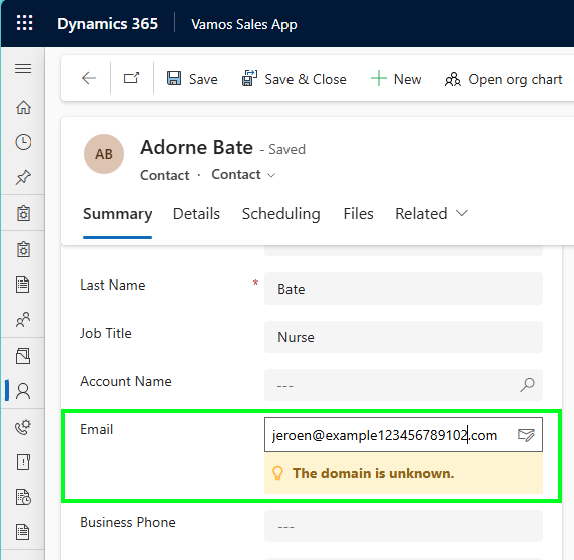
smart email address validation for columns

The checks that are part of this smart email address validation are as follows, and this is directly coming from the Microsoft website (link here):

  • Incorrect syntax: For example, an address that doesn’t contain both a username and an email domain.
  • Disposable domain: An address that contains a known disposable or temporary email domain.
  • Test or spam email addresses. An address that contains known indicators of a test or spam address in the email header or metadata, IP address, HTML code of the email, and email content and formatting.
  • Expired email addresses: This is an email account that has expired and can no longer receive or send email.
  • Emails that bounce back: This is an address that can’t receive a message for any reason other than being expired.

Personally speaking, I do not have much experience myself to determine if this feature was a good or bad thing to have. If you do have more experience with this or have a better understanding of why it is a good or bad thing that this is going to be deprecated, then feel free to drop a comment.

Enable/Disable smart email address validation for columns

In order to enable or disable the setting for email address validation for columns, you need to:

  • Open the Power Platform Admin Center
  • Navigate to Environments
  • Select the environment where you want to enable this for
  • Select Settings
  • Navigate to the Data Validation section
  • Enable/Disable the Enable email address validation in model-driven apps (preview)
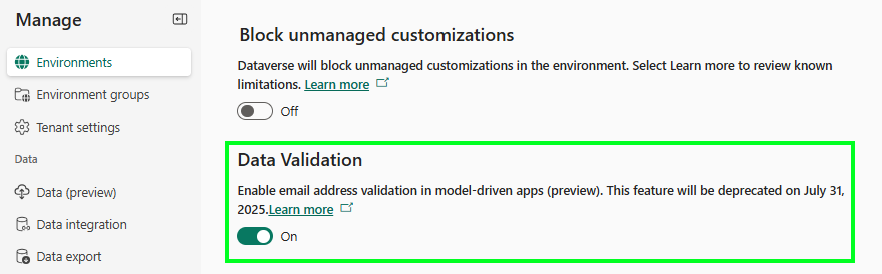
On the model-driven app level, you can enable/disable this as well by:

  • Open the model-driven app
  • Select Settings
  • Navigate to the Upcoming section
  • Enable/Disable the Enable Smart Email Address Validation Control
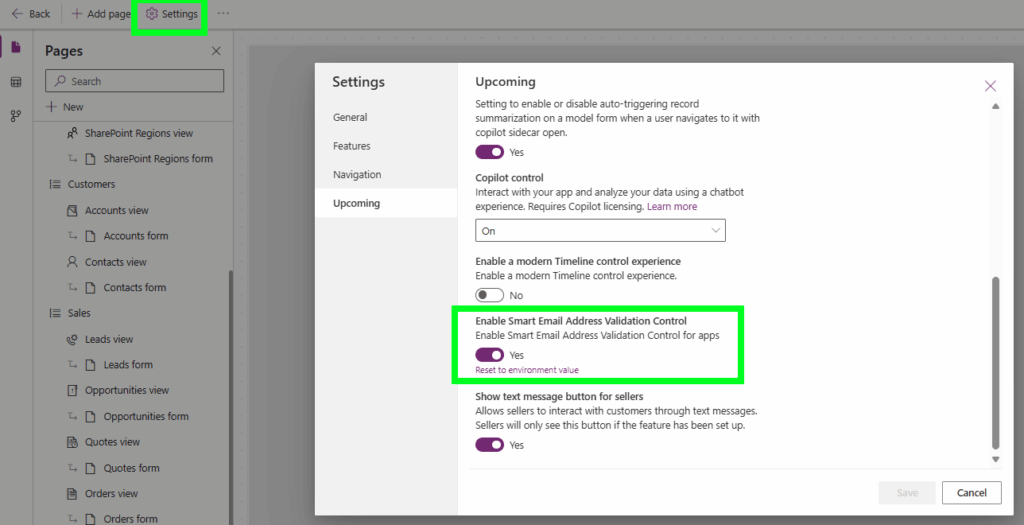
Model-driven Apps Power Apps deprecatiedemail address validationsmart email validation

Post navigation

Previous post
Next post

Related Posts

Model-driven Apps Sublime way of collaborating

Sublime way of collaborating on a record in model-driven apps

Posted on July 2, 2024July 17, 2024

Sometimes you come across something that you think “Ah that is kind of cool”. I had such a moment this week where I came across something around collaboration on a record within a model-driven app. It is already there for a couple of months based on what I can see,…

Read More
AI Builder prioritize seasonal sales using ai

Prioritize seasonal sales using AI

Posted on January 22, 2025January 21, 2025

In the past, I wrote about the UEFA Euro soccer championship and used the AI Builder prediction model to predict how well the Dutch team would perform (URL to post). That made me wonder if I could find a use case to apply a custom prediction model to one of…

Read More
Model-driven Apps

Use colors for choice columns in your views

Posted on December 11, 2024December 10, 2024

Last week I posted something about the Power App Grid Control that allows you to get the jump bar back in your views (read the full post here). One of the other cool settings on this control is it allows you to use colors for choice columns in your views,…

Read More

Comment

  1. Megan Walker says:
    June 12, 2025 at 9:58 am

    This is such a shame, I love this little feature and would have been great if they could improve it rather than getting rid of it. It was a little buggy, and I noticed several times where it looked like the email field was empty when I knew it wasn’t. You needed to refresh the screen to get it to show again which could cause users to either miss information or type in to it by mistake, typing over something that was already on the record.

    Reply

Leave a Reply Cancel reply

Your email address will not be published. Required fields are marked *

ABOUT ME

  • LinkedIn
  • Mail
  • GitHub
  • YouTube
"BizApps and PowerPlatform dude with a passion for AI, sitting relaxt in his black shirt on a bounty white beach with palm trees, a azure blue ocean in the background and enjoying a good coffee "

~GenAI - DALL.E 3 and GPT 3.5

Subscribe

Please wait...

Thank you for subscribing!

Search

Categories

  • Agents
  • AI Builder
  • AI Prompting
  • Artificial Intelligence
  • Copilot
  • Copilot Studio
  • Customer Insights
  • Customer Service
  • Dataverse
  • Field Services
  • Generative AI
  • Model-driven Apps
  • Personal Development
  • Power Apps
  • Power Automate
  • Power BI
  • Power Platform
  • Reporting
  • Sales
  • SharePoint

Archive

  • June 2026
  • May 2026
  • March 2026
  • February 2026
  • January 2026
  • December 2025
  • November 2025
  • October 2025
  • August 2025
  • July 2025
  • June 2025
  • May 2025
  • April 2025
  • March 2025
  • February 2025
  • January 2025
  • December 2024
  • November 2024
  • October 2024
  • September 2024
  • August 2024
  • July 2024
  • June 2024
  • May 2024
© 2024 - All rights reserved | Jeroen Scheper | Privacy Policy