Skip to content
JScheper.com
JScheper.com

BizApps, Powerplatform and AI

  • Home
  • Blog
  • Contact
JScheper.com

BizApps, Powerplatform and AI

activate a previous quote revision

Activate a previous quote revision, that easy!

Posted on April 22, 2025April 15, 2025 By Jeroen Scheper

You have perhaps faced this in the past, you are working with a client on a quote. Creating multiple revisions that go back and forward, and then the client gives approval on revision 2 😅, which is closed already. Now you likely don’t want to rebuild revision 2 with the current version that you have, which is active; lucky you, you can activate a previous quote revision in a few steps.

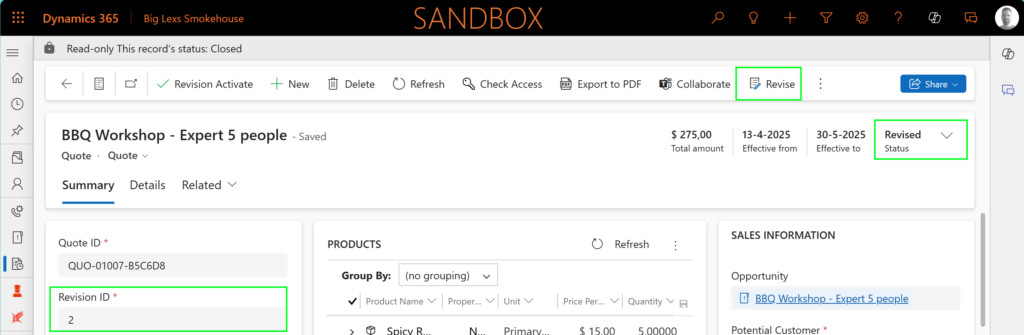
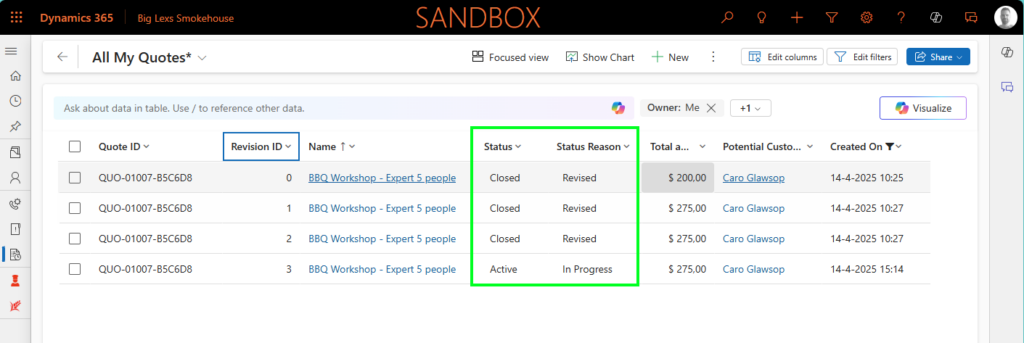
In order to explain how you can easily do this, I would like to use the example below about quote QUO-01007-B5C6D8, which has 3 revisions.
activate a previous quote revision

When you open revision 2 and directly try to revise this quote from the ribbon, you will get the following message, which indicates that you can only have one active (or draft) quote for that quote number.
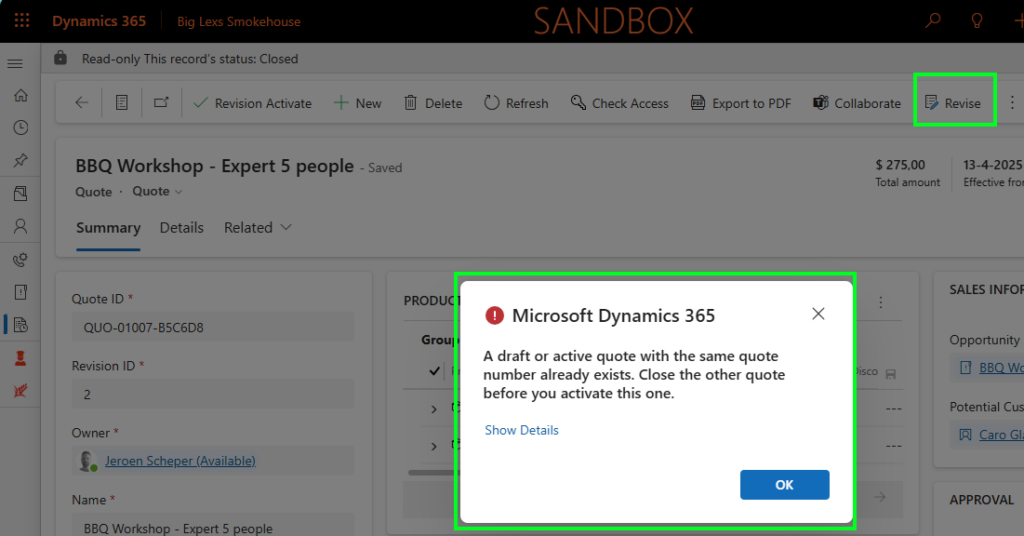
So in order to do this in the right fashion, we need to follow the next steps:

Close the Active Quote

First, you need to close the current active quote, and you can do this by:

  1. Open the current active quote, in our example revision 3
  2. Select Close Quote from the ribbon
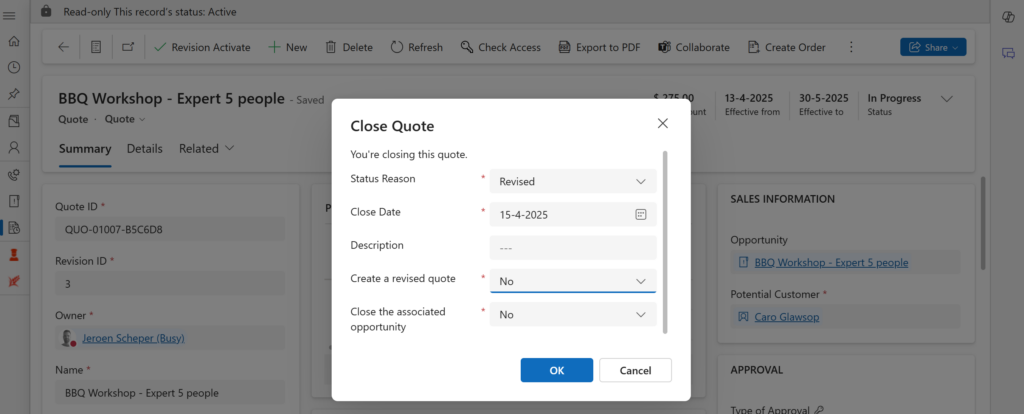
  3. Within the popup, there are 3 important fields to set:
    • Status Reason = Revised
    • Create a revised quote = No (this needs to be set to No, since you would like to activate a previous version)
    • Close the associated opportunity = No (ideally, you only want to close this when marking the quote as Won)
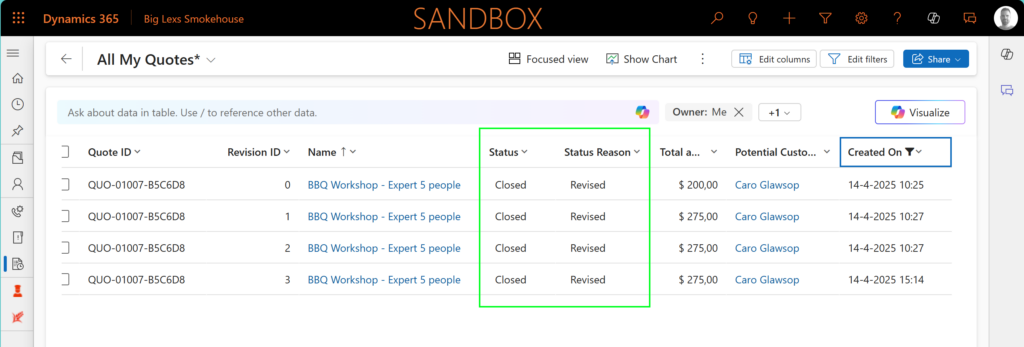
After following the steps above, the current state will be as follows, where all quotes will be marked Closed – Revised
Activate a previous quote revision

Now you need to find the previous revision of the quote that the client wanted, in our example, revision 2. Follow the next steps to make this active again:

  1. Open the particular quote revision, in my example revision 2
  2. Select Revise from the ribbon

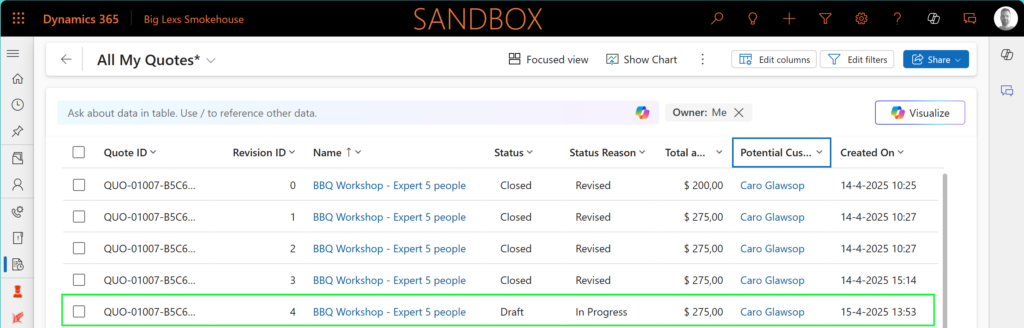
This will result into a new revision (revision 4) that is based on revision 2, as you can see below.

Sales Model-driven Apps Activate previous versionQuote Revision

Post navigation

Previous post
Next post

Related Posts

SharePoint Single SharePoint document storage

Single SharePoint document storage place across sales process

Posted on July 23, 2025July 21, 2025

Let’s start with the fact that I am not a SharePoint “Guru,” so I still need to learn a lot in that area. I wanted to have a single SharePoint document storage place for the sales process of Padel Vamos. The difficulties I found when working with SharePoint are the…

Read More
Sales reopen a won quote

Reopen a won quote, as simple as that?

Posted on April 9, 2025April 8, 2025

On the opportunity record, this functionality has already existed for a long time, and I have had lots of requests from colleagues who were asking, “Can I reopen a won quote? ” because the customer came back to us, and now I need to make a few minor changes to…

Read More
Power Apps enable column reordering in views Power App Grid Control

Power Apps Grid Control: Enable column reordering in views

Posted on January 15, 2025January 15, 2025

Recently I have posted a few things about the Power Apps Grid Control and how you can enable the jump bar (here) or use colors in your choice columns (here) to make it more user-friendly or look nicer. When using the Power Apps Grid Control, one of the things that…

Read More

Leave a Reply Cancel reply

Your email address will not be published. Required fields are marked *

ABOUT ME

  • LinkedIn
  • Mail
  • GitHub
  • YouTube
"BizApps and PowerPlatform dude with a passion for AI, sitting relaxt in his black shirt on a bounty white beach with palm trees, a azure blue ocean in the background and enjoying a good coffee "

~GenAI - DALL.E 3 and GPT 3.5

Subscribe

Please wait...

Thank you for subscribing!

Search

Categories

  • Agents
  • AI Builder
  • AI Prompting
  • Artificial Intelligence
  • Copilot
  • Copilot Studio
  • Customer Insights
  • Customer Service
  • Dataverse
  • Field Services
  • Generative AI
  • Model-driven Apps
  • Personal Development
  • Power Apps
  • Power Automate
  • Power BI
  • Power Platform
  • Reporting
  • Sales
  • SharePoint

Archive

  • March 2026
  • February 2026
  • January 2026
  • December 2025
  • November 2025
  • October 2025
  • August 2025
  • July 2025
  • June 2025
  • May 2025
  • April 2025
  • March 2025
  • February 2025
  • January 2025
  • December 2024
  • November 2024
  • October 2024
  • September 2024
  • August 2024
  • July 2024
  • June 2024
  • May 2024
© 2024 - All rights reserved | Jeroen Scheper | Privacy Policy