Skip to content
JScheper.com
JScheper.com

BizApps, Powerplatform and AI

  • Home
  • Blog
  • Contact
JScheper.com

BizApps, Powerplatform and AI

Sublime way of collaborating

Sublime way of collaborating on a record in model-driven apps

Posted on July 2, 2024July 17, 2024 By Jeroen Scheper

Sometimes you come across something that you think “Ah that is kind of cool”. I had such a moment this week where I came across something around collaboration on a record within a model-driven app. It is already there for a couple of months based on what I can see, but I missed it completely. It is now possible to see who is on the same form and record as you are which is super helpful when collaborating on something together. When you are working on the same record, next to the Share button the list of users will appear.
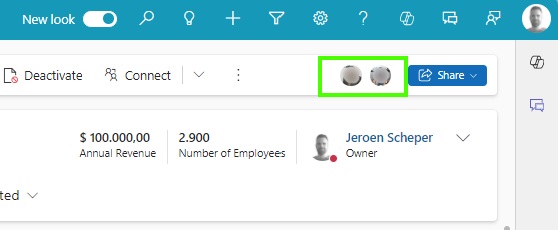
Sublime way of collaborating

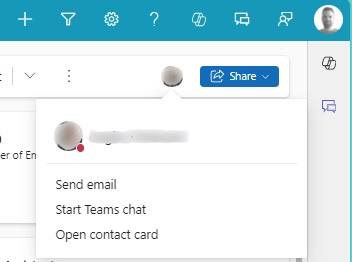
The cool thing about this sublime way of collaborating is that it allows you to:

  • See the online status of the user(s)
  • Send them an email
  • Start a Teams Chat

The one thing I am not sure of is whether this functionality is still in preview or not, since I have seen some conflicting messages on this when you check the documentation from Microsoft.
Microsoft documentation: Collaborate with others in model-driven apps – Power Apps | Microsoft Learn

Enable sublime way of collaborating

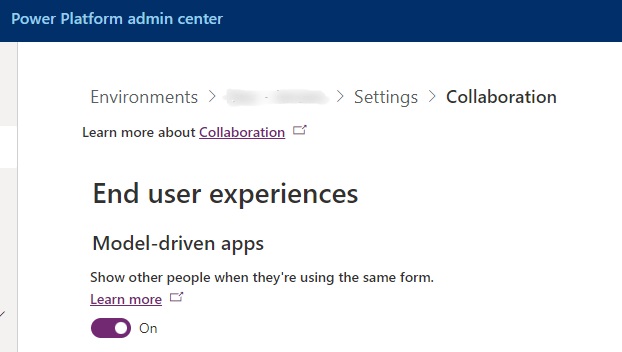
To enable this feature in your environment, please follow the next steps:

  1. Open the Power Platform Admin Center (https://admin.powerplatform.microsoft.com)
  2. Select the environment where you want to enable this feature in
  3. Navigate to Settings > Collaboration
  4. Turn on the End User Experiences > Model-Driven apps
Model-driven Apps Customer Insights Customer Service Field Services Sales Collaboration

Post navigation

Previous post
Next post

Related Posts

Sales reopen a won quote

Reopen a won quote, as simple as that?

Posted on April 9, 2025April 8, 2025

On the opportunity record, this functionality has already existed for a long time, and I have had lots of requests from colleagues who were asking, “Can I reopen a won quote? ” because the customer came back to us, and now I need to make a few minor changes to…

Read More
SharePoint Single SharePoint document storage

Single SharePoint document storage place across sales process

Posted on July 23, 2025July 21, 2025

Let’s start with the fact that I am not a SharePoint “Guru,” so I still need to learn a lot in that area. I wanted to have a single SharePoint document storage place for the sales process of Padel Vamos. The difficulties I found when working with SharePoint are the…

Read More
AI Builder AI Builder language models

Leverage AI Builder language models to collaborate more easily

Posted on October 2, 2024October 2, 2024

Within the AI Builder, there is a whole range of prebuilt models that you can use within for example the Power Platform. In this blog post, I would like to focus on two AI Builder language models that are prebuilt and available to you: Use case: Padel Vamos goes internationally…

Read More

Leave a Reply Cancel reply

Your email address will not be published. Required fields are marked *

ABOUT ME

  • LinkedIn
  • Mail
  • GitHub
  • YouTube
"BizApps and PowerPlatform dude with a passion for AI, sitting relaxt in his black shirt on a bounty white beach with palm trees, a azure blue ocean in the background and enjoying a good coffee "

~GenAI - DALL.E 3 and GPT 3.5

Subscribe

Please wait...

Thank you for subscribing!

Search

Categories

  • Agents
  • AI Builder
  • AI Prompting
  • Artificial Intelligence
  • Copilot
  • Copilot Studio
  • Customer Insights
  • Customer Service
  • Dataverse
  • Field Services
  • Generative AI
  • Model-driven Apps
  • Personal Development
  • Power Apps
  • Power Automate
  • Power BI
  • Power Platform
  • Reporting
  • Sales
  • SharePoint

Archive

  • June 2026
  • May 2026
  • March 2026
  • February 2026
  • January 2026
  • December 2025
  • November 2025
  • October 2025
  • August 2025
  • July 2025
  • June 2025
  • May 2025
  • April 2025
  • March 2025
  • February 2025
  • January 2025
  • December 2024
  • November 2024
  • October 2024
  • September 2024
  • August 2024
  • July 2024
  • June 2024
  • May 2024
© 2024 - All rights reserved | Jeroen Scheper | Privacy Policy