
Skip to content
JScheper.com
JScheper.com

BizApps, Powerplatform and AI

  • Home
  • Blog
  • Contact
JScheper.com

BizApps, Powerplatform and AI

turn off suggestions in Dynamics

How do you turn off suggestions in Dynamics?

Posted on July 25, 2024July 25, 2024 By Jeroen Scheper

Are you also frustrated by the new form fill assistance from Copilot?

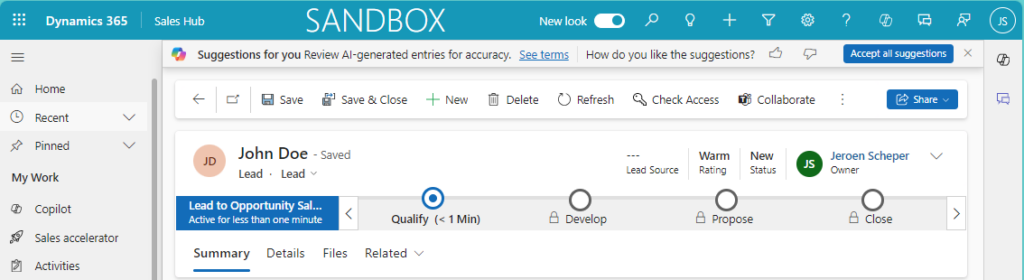
Lucky you, you can turn off suggestions in Dynamics since it is enabled by default. Some of you probably have seen it, when filling in a main form all of a sudden a Copilot bar pops up and asks “Accept all suggestions?” This new “suggestions” feature is also called Copilot assistance,
turn off suggestions in Dynamics

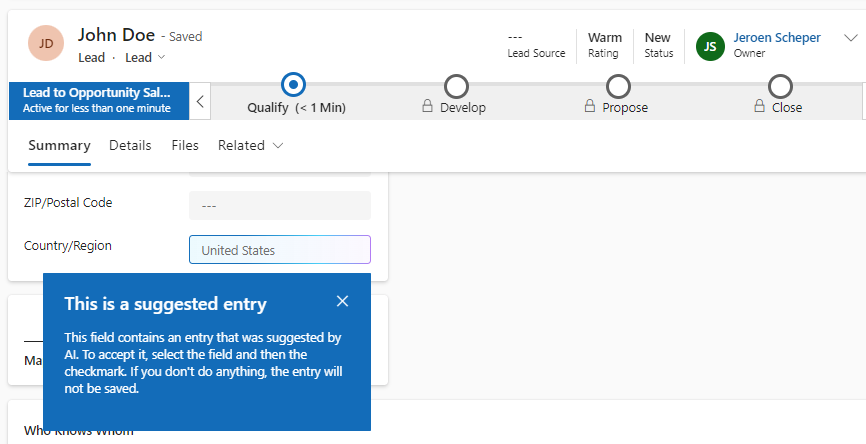
On the form it highlights, in a blue/purple square, the fields where it has generated AI-suggested data. You can accept the AI-suggested data in one go by clicking Accept all suggestions in the Copilot ribbon or you can go over each individual suggestion and Accept it.
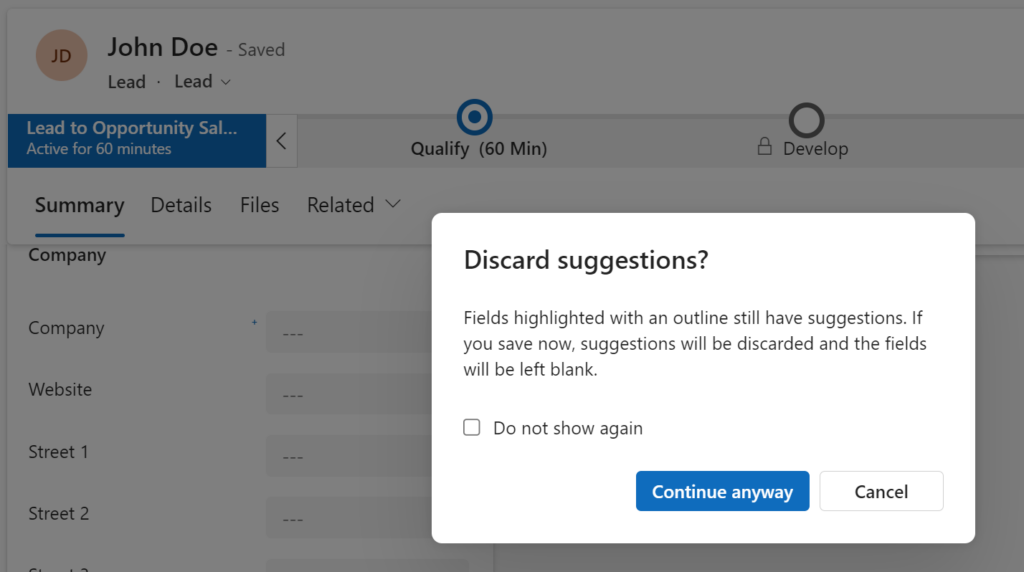
The annoying thing is, if you did not make any changes to your record in the form, and would try to navigate away from the record, you get the popup below. This probably makes you think you did accidentally change something on the record, which you did not. So if that is the case, it is ok to select Continue anyway.
Turn off suggestions in Dynamics

In order to turn off suggestions in Dynamics, please follow the next steps:

  • open the Power Platform Admin Center
  • from the navigation, select the right Environment
  • select Settings from the menu bar
  • navigate to Product / Feature section
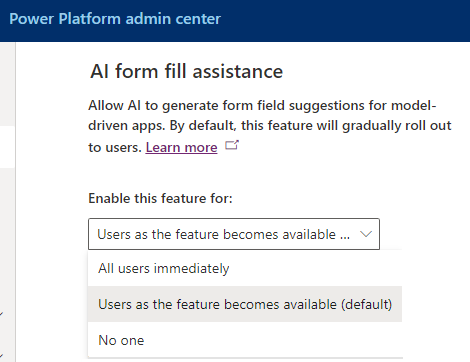
  • find the AI form fill assistance section

The default value is Users as the feature becomes available (default) and this should be changed to: No one.

Copilot Artificial Intelligence Customer Insights Customer Service Field Services Sales

Post navigation

Previous post
Next post

Related Posts

Model-driven Apps jump bar in the view

Where is my jump bar in the view?

Posted on December 5, 2024December 10, 2024

A few (Wave) updates back, I can’t remember when exactly, when you were navigating to the different menu items you would get a view with for example active accounts, but at the bottom you would see the jump bar in the view. This jump bar was very useful if you…

Read More
AI Builder AI Builder language models

Leverage AI Builder language models to collaborate more easily

Posted on October 2, 2024October 2, 2024

Within the AI Builder, there is a whole range of prebuilt models that you can use within for example the Power Platform. In this blog post, I would like to focus on two AI Builder language models that are prebuilt and available to you: Use case: Padel Vamos goes internationally…

Read More
Power BI Visualize your view with Power BI

Visualize your view with Power BI

Posted on November 6, 2024November 6, 2024

Sometimes you stumble upon a feature that makes you think “that is pretty cool 😎”. There are plenty of ways of interrogating sales data within Dynamics 365 which I will touch in a bit, but there is also an option that I was not aware of is to visualize your…

Read More

Leave a Reply Cancel reply

Your email address will not be published. Required fields are marked *

ABOUT ME

  • LinkedIn
  • Mail
  • GitHub
  • YouTube
"BizApps and PowerPlatform dude with a passion for AI, sitting relaxt in his black shirt on a bounty white beach with palm trees, a azure blue ocean in the background and enjoying a good coffee "

~GenAI - DALL.E 3 and GPT 3.5

Subscribe

Please wait...

Thank you for subscribing!

Search

Categories

  • Agents
  • AI Builder
  • AI Prompting
  • Artificial Intelligence
  • Copilot
  • Copilot Studio
  • Customer Insights
  • Customer Service
  • Dataverse
  • Field Services
  • Generative AI
  • Model-driven Apps
  • Personal Development
  • Power Apps
  • Power Automate
  • Power BI
  • Power Platform
  • Reporting
  • Sales
  • SharePoint

Archive

  • July 2026
  • June 2026
  • May 2026
  • March 2026
  • February 2026
  • January 2026
  • December 2025
  • November 2025
  • October 2025
  • August 2025
  • July 2025
  • June 2025
  • May 2025
  • April 2025
  • March 2025
  • February 2025
  • January 2025
  • December 2024
  • November 2024
  • October 2024
  • September 2024
  • August 2024
  • July 2024
  • June 2024
  • May 2024
© 2024 - All rights reserved | Jeroen Scheper | Privacy Policy