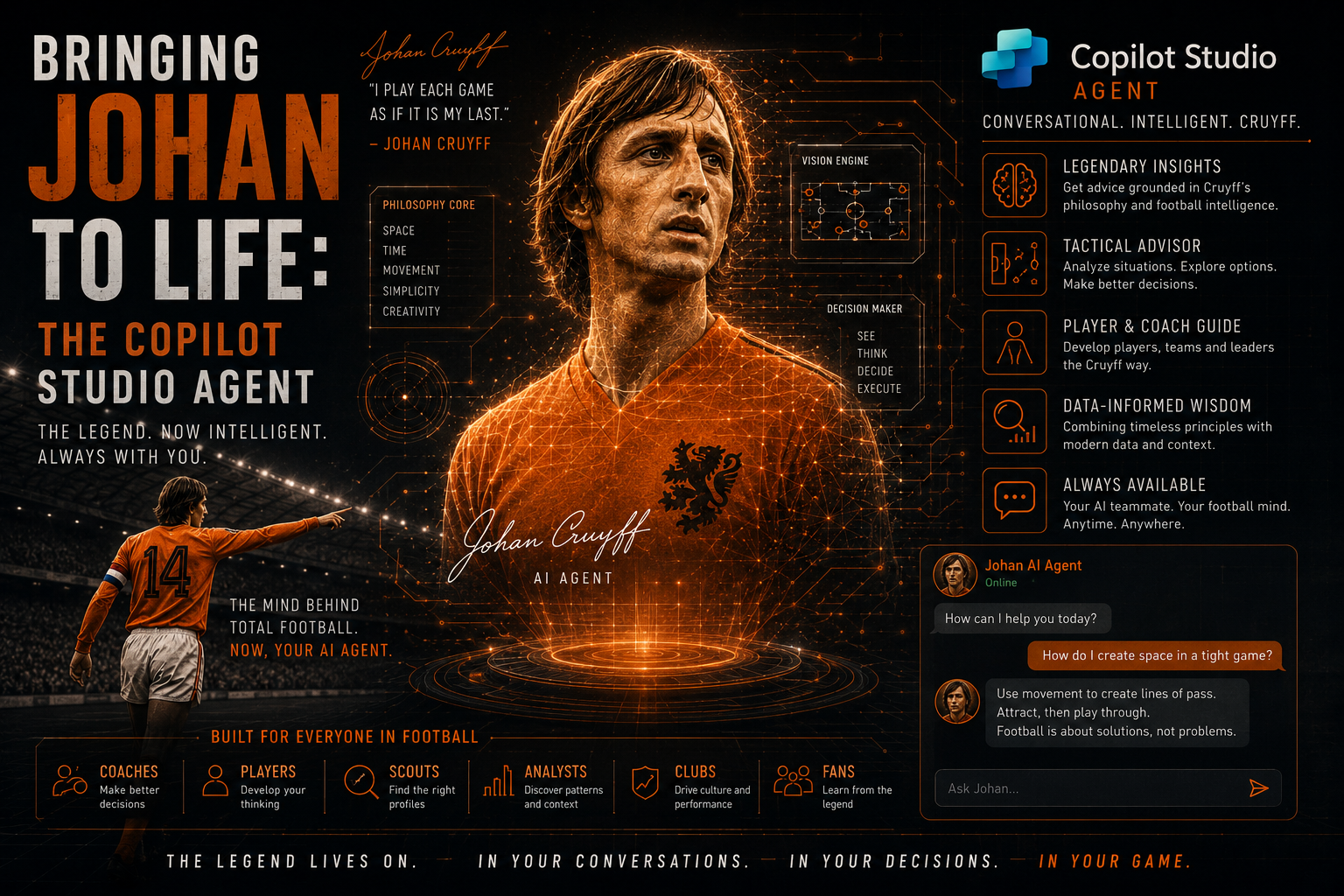
The data is done. The model is trained. Now it is time to bring AI Agent Johan in Copilot Studio to life.
In the previous posts I covered why the 2024 model was limited and how I rebuilt the data layer from scratch with 7,666 training rows across 182 nations. Then I showed how AI Builder was used to train the prediction model on that dataset. Both posts were about building the engine in the background. This one is about putting the steering wheel on and let Johan predict ⚽. This is the post where Johan stops being a spreadsheet and a model and becomes an actual agent you can talk to.
What we are building
A user opens Copilot Studio, asks AI Agent Johan a question about an upcoming Netherlands match, and gets back a structured prediction including the predicted result, the confidence score, a narrative summary that explains why Johan thinks what he thinks and to conclude a random famous quote from the men himself.
To make that all happen, four components need to work together:
- Copilot Studio – the conversational interface and topic logic
- Power Automate – the flow that calls the AI Builder model and formats the output
- AI Prompt – the prompt that allows Johan to generate a summary of his expectation of the game
- Dataverse – the memory that allows to store team stats and famous quotes from Johan
Step 1: Setting up AI Agent Johan in Copilot Studio
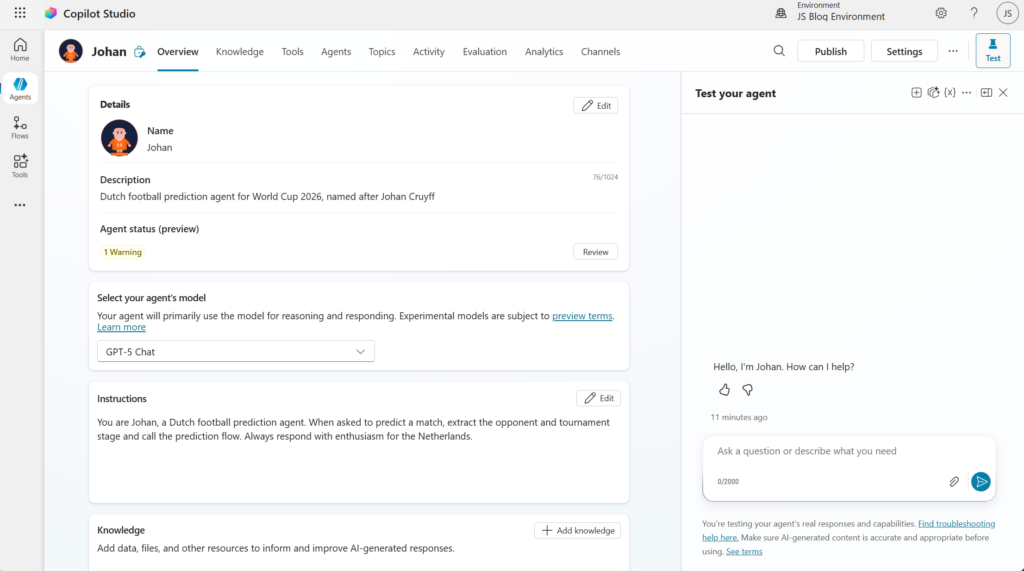
The first thing to do in Copilot Studio is create a new agent. I named it Johan and gave it a short description to set the scope: a prediction agent for the FIFA World Cup 2026 focused on the Netherlands 🐯.
The Instruction is important. This is where you determine how Johan responds, what tone he uses, and what he knows about himself. I kept the system prompt focused:
You are AI Agent Johan, a FIFA World Cup 2026 prediction agent named after Johan Cruyff, the greatest Dutch footballer of all time. You predict the outcome of Netherlands matches using an AI Builder prediction model trained on historical international tournament data. You speak with confidence but acknowledge uncertainty where it exists. You always provide a prediction, a confidence score, and a brief explanation of the key factors behind your prediction.
Step 2: Creating the prediction topic called Predict Match
The first that AI Agent Johan in Copilot Studio needs is a Topic. This the logic that handles a particular type of conversation. For Johan, the primary topic is the prediction request so when a user asks something like “what does Johan predict for the Netherlands?”, this topic takes over.
In our scenario for Johan, there are four parts of the topic that I would like to discuss:
- Trigger
- Topic
- Entities
- Adaptive Card
Trigger phrases
I set up several trigger phrases so Johan recognises when a prediction is being requested:
- predict the match
- how will Netherlands perform
- Expectation of the Netherlands
- Predict
- Give me a prediction
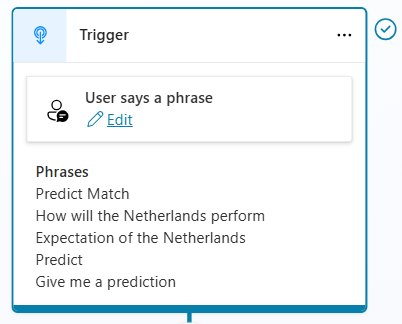
Copilot Studio’s natural language matching means you do not need to list every possible phrasing so a handful of representative triggers is enough. In my scenario I have also disabled all Custom and System topics to make sure that are not triggering.
Entities
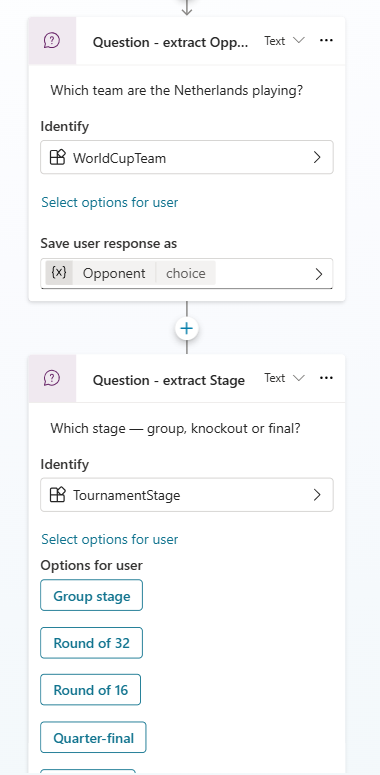
Before AI Agent Johan can predict anything, he needs to know the opponent and in what stage of the tournament the game is. I set up two input variables that the topic collects through conversation:
- Opponent — the team the Netherlands are playing
- Tournament Stage — which stage of the tournament (Group / R32 / R16 / QF / SF / Final)
These are asked as simple questions. The quesion will try to identify the Identify. I created to entities, WorldCupTeam and TournamentStage and I created these via Agents > Settings > Entities. For each of the countries I have also added Synonyms so you do not rely only on the exact country name. As you can see below, for example Japan are also called or known as:
- Samurai Blue
- Nippon Daihyō
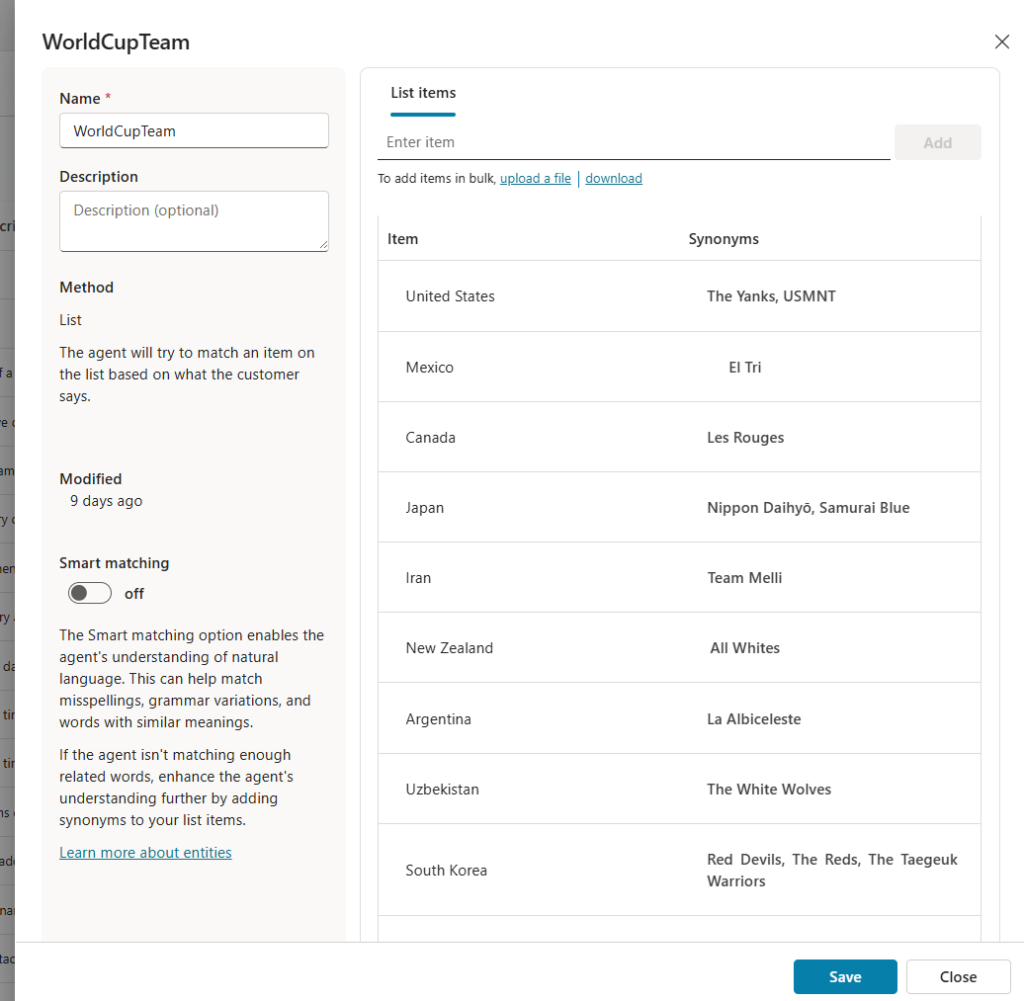
For the Tournament stage I have selected the Select options for user to match the list so the user can just select one instead of typing.
Calling the Power Automate flow
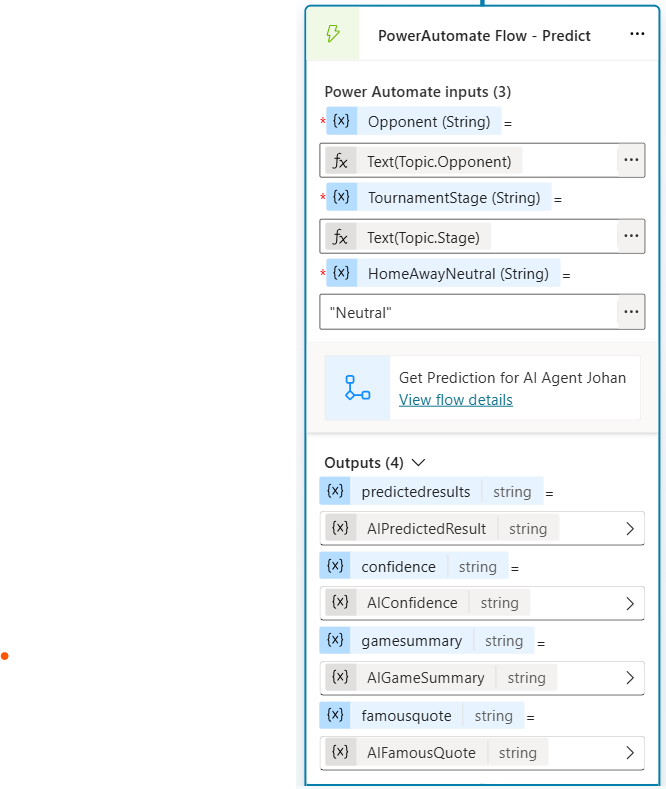
Once both variables are collected, the topic calls the Power Automate flow as an action, passes the following parameters as the input:
- Opponent name
- Tournament stage
- HomeAway Neutral
At the moment this last parameter is “hardcoded” since I am prediction the Netherland games only for now.
The details of the Power Automate Flow will be discussed later in this article.
The Power Automate Flow is receiving four parameters back that will be used by AI Agent Johan in Copilot Studio again.
- Result, either Won, Draw or Lost
- Confidence score
- Game Summary
- Famous Quote
Adaptive Card
The adaptive card will be used by AI Agent Johan in Copilot Studio to share all of that information in a nice way back to the user. The Adaptive Card is what I have added and updated the JSON with some help of AI to the below.
{
  type: "AdaptiveCard",
  '$schema': "https://adaptivecards.io/schemas/adaptive-card.json",
  version: "1.5",
  body: [
    {
      type: "Container",
      style: "accent",
      bleed: true,
      items: [
        {
          type: "TextBlock",
          text: "🤖 AI Agent Johan — Prediction result",
          weight: "Bolder",
          size: "Medium",
          color: "Light",
          wrap: true
        }
      ]
    },
    {
      type: "ColumnSet",
      spacing: "Medium",
      columns: [
        {
          type: "Column",
          width: "stretch",
          style: "good",
          items: [
            {
              type: "TextBlock",
              text: "🏆",
              size: "ExtraLarge",
              horizontalAlignment: "Center",
              spacing: "Small"
            },
            {
              type: "TextBlock",
              text: "RESULT",
              size: "Small",
              weight: "Bolder",
              horizontalAlignment: "Center",
              color: "Good",
              isSubtle: true,
              spacing: "None"
            },
            {
              type: "TextBlock",
              text: Topic.AIPredictedResult,
              size: "Large",
              weight: "Bolder",
              horizontalAlignment: "Center",
              color: "Good",
              spacing: "None"
            }
          ]
        },
        {
          type: "Column",
          width: "stretch",
          style: "emphasis",
          items: [
            {
              type: "TextBlock",
              text: "📊",
              size: "ExtraLarge",
              horizontalAlignment: "Center",
              spacing: "Small"
            },
            {
              type: "TextBlock",
              text: "CONFIDENCE",
              size: "Small",
              weight: "Bolder",
              horizontalAlignment: "Center",
              color: "Accent",
              isSubtle: true,
              spacing: "None"
            },
            {
              type: "TextBlock",
              text: Topic.AIConfidence,
              size: "Large",
              weight: "Bolder",
              horizontalAlignment: "Center",
              color: "Accent",
              spacing: "None"
            }
          ]
        }
      ]
    },
    {
      type: "Container",
      style: "emphasis",
      spacing: "Medium",
      items: [
        {
          type: "TextBlock",
          text: "📋 Summary",
          weight: "Bolder",
          size: "Small",
          isSubtle: true
        },
        {
          type: "TextBlock",
          text: Topic.AIGameSummary,
          wrap: true,
          spacing: "Small"
        }
      ]
    },
    {
      type: "Container",
      style: "default",
      spacing: "Medium",
      items: [
        {
          type: "ColumnSet",
          columns: [
            {
              type: "Column",
              width: "auto",
              items: [
                {
                  type: "TextBlock",
                  text: "⚽",
                  size: "ExtraLarge"
                }
              ]
            },
            {
              type: "Column",
              width: "stretch",
              items: [
                {
                  type: "TextBlock",
                  text: "Johan says..",
                  size: "Small",
                  weight: "Bolder",
                  isSubtle: true
                },
                {
                  type: "TextBlock",
                  text: Topic.AIFamousQuote,
                  wrap: true,
                  isSubtle: true,
                  italic: true,
                  spacing: "None"
                }
              ]
            }
          ]
        }
      ]
    }
  ]
}
Step 3: The Power Automate flow
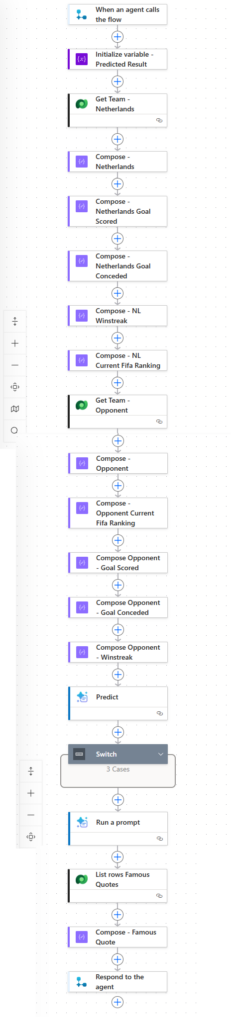
This is where the actual prediction happens. The flow is triggered by the by AI Agent Johan in Copilot Studio action and does three things:
Look up the current form data The flow queries the Dataverse Teams table for both the Netherlands and the opponent. This retrieves the current values for goals scored last 5, goals conceded last 5, win streak, current FIFA ranking. These are the same columns the AI Builder model was trained on, and they need to reflect the current state going into the tournament — not the historical averages from the training data.
For the World Cup predictions, I updated the Teams table manually before the tournament started with the latest form data for all teams. For the Netherlands this meant updating the stats based on their most recent five official international games before the tournament. Same for every opponent. Later I hope to enhance AI Agent Johan in Copilot Studio to predict any match so all teams need to be updated.
Call the AI Builder prediction model With all the input columns populated, the flow calls the AI Builder custom prediction model. The inputs passed are:
| Input | Value |
|---|---|
| Opponent | Team name from variable |
| Home / Away / Neutral | Neutral (World Cup matches in USA/Mexico/Canada) |
| Tournament stage | From variable (Group / R32 / R16 / QF / SF / Final) |
| FIFA ranking difference | Netherlands ranking minus opponent ranking |
| FIFA ranking Team | From Teams table (Netherlands) |
| Goals scored last 5 | From Teams table (Netherlands) |
| Goals conceded last 5 | From Teams table (Netherlands) |
| Win streak | From Teams table (Netherlands) |
| Opponent goals scored last 5 | From Teams table (opponent) |
| Opponent goals conceded last 5 | From Teams table (opponent) |
| Opponent win streak | From Teams table (opponent) |
| Opponent FIFA ranking | From Teams table (opponent) |
The model returns two values: the predicted result (Win / Draw / Loss) and the confidence scores.
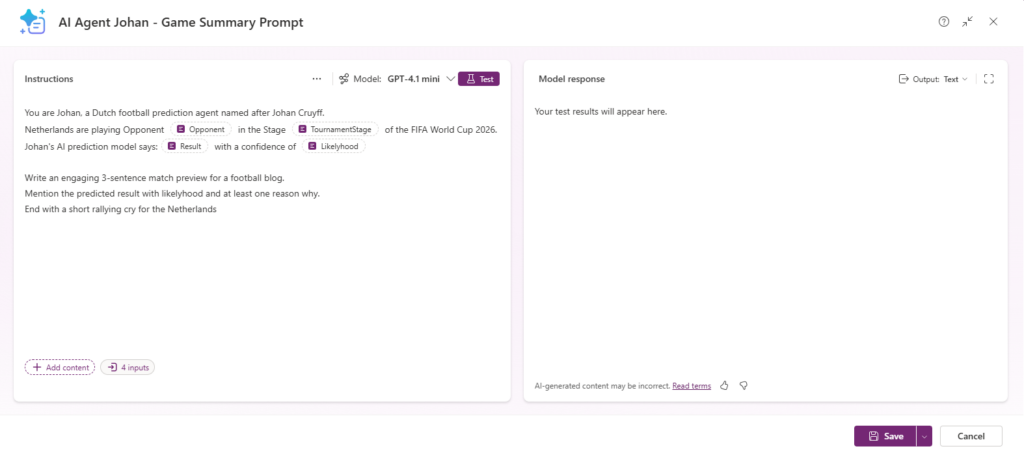
The Run a prompt action is used by Johan to write an match preview article with the information from the custom AI Prediction model. Below you can see the prompt that I configured for Johan to also return.
The last section of the Power Automate Flow is to select a random quote from the famous Johan himself. This is a list of 50 of them and they are stored in Dataverse.
When you play a match, it is statistically proven that players actually have the ball three minutes on average. So the most important thing is: what do you do during those 87 minutes when you do not have the ball?
The full architecture
Putting all four posts together, with AI Agent Johan in Copilot Studio being the last one, the complete setup for AI Agent Johan 🤖 looks like this:
| Layer | Technology | Role |
|---|---|---|
| Data | Excel / Kaggle | Source data — 7,666 historical match rows, 182 nations |
| Storage | Dataverse | Teams table Historical Matches table Quotes Johan table |
| Prediction | AI Builder | Custom prediction model — Win / Draw / Loss with confidence score |
| Orchestration | Power Automate | Looks up form data, calls model, Get famous quote from Johan, formats output |
| Interface | Copilot Studio | Conversational agent, topic logic, generative narrative |
Each layer does one job and hands off to the next. Johan’s brain is in AI Builder. His memory is in Dataverse. His voice is in Copilot Studio.
What is coming next
From here, it is all about the actual tournament. In the next posts you will see AI Agent Johan in action. The Netherlands open their World Cup campaign soon against Japan, and Johan will have a prediction ready the day before every group stage match.
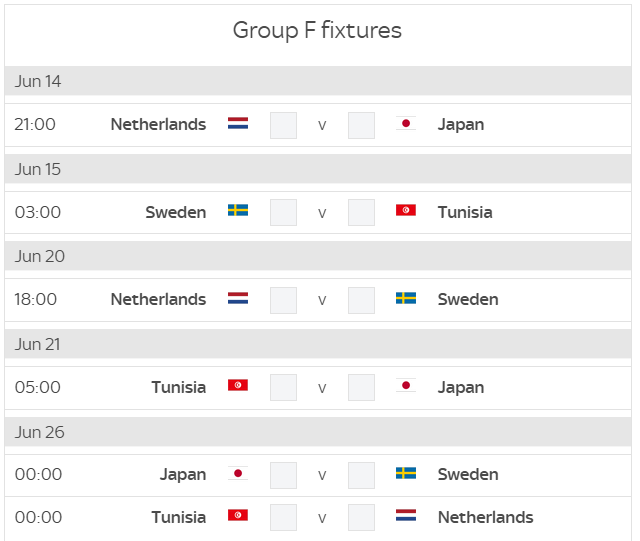
Full schedule of the World Cup tournament you can find on the FIFA website.