Skip to content
JScheper.com
JScheper.com

BizApps, Powerplatform and AI

  • Home
  • Blog
  • Contact
JScheper.com

BizApps, Powerplatform and AI

flow has a new trigger URL

Your flow has a new trigger URL but does not trigger?

Posted on November 27, 2025November 27, 2025 By Jeroen Scheper

Probably lots of people have received emails over the last couple of months about a flow has a new trigger URL. The deadline for sorting this out is November 30th. Microsoft has made changes to the way HTTP trigger URLs work. According to the Questions section on Microsoft Learn, someone also asked about the reasoning. Microsoft is migrating HTTP trigger endpoints from the older logic.azure.com domain to the new api.powerplatform.com domain (link to MS Learn Question can be found here)
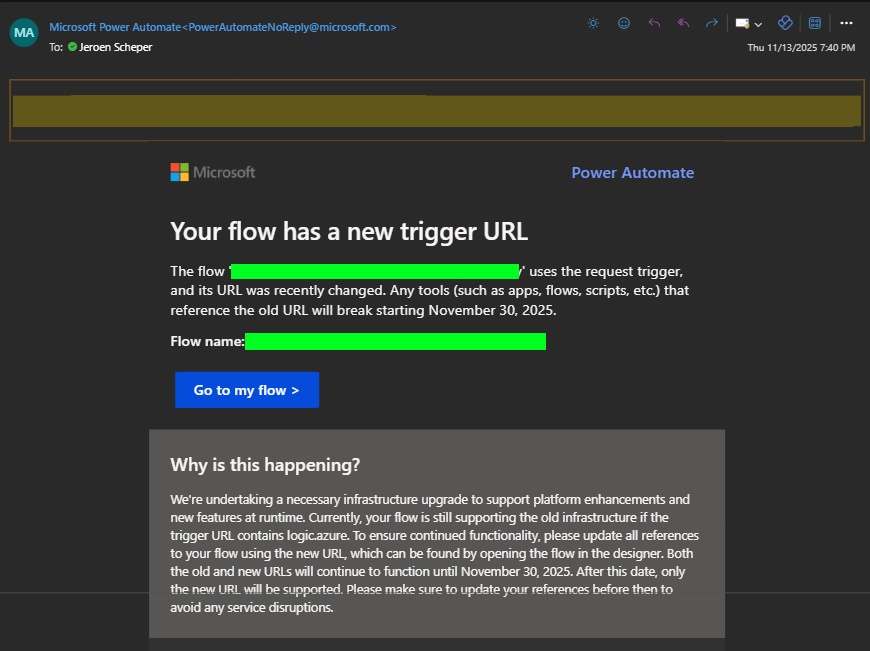
flow has a new trigger url

I was facing an issue that I thought would be worth sharing since you might benefit from it. This is the situation:

A long time ago, when there was no make.powerapps.com to edit the command bar and add new fancy buttons, and also no Environment Variables, I was using XRMToolbox > Ribbon Workbench for customising menu bars. The process was simple:

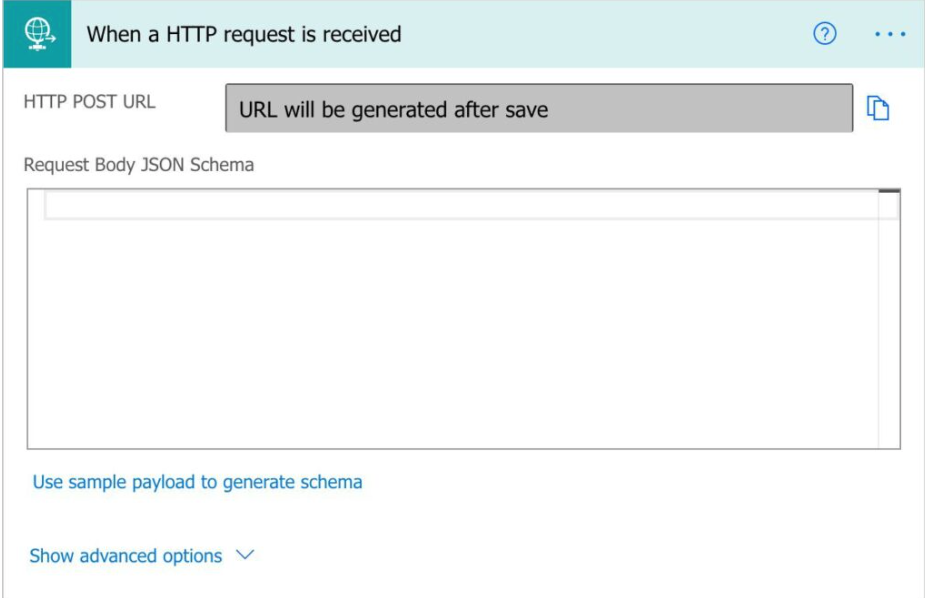
  • Create a Power Automate Flow that uses the When a HTTP Request is received
  • After creating some JSON and saving the record, the URL was generated
  • Open the Ribbon Work Bench from the XRMToolBox and open the entity via a solution
  • Add a new custom button and paste the generated URL in there as one of the parameters.
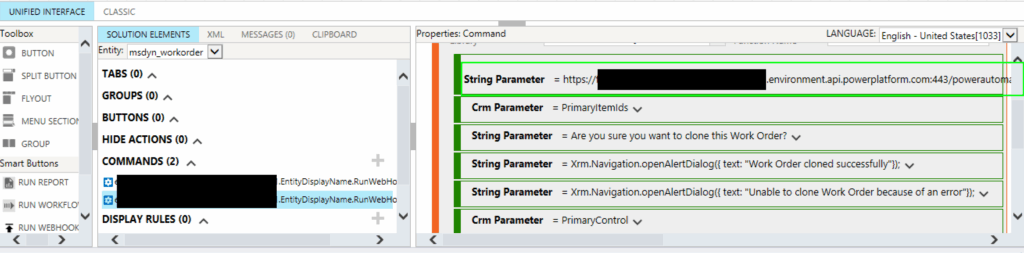
There are two things that I faced when updating the URLs

  • The documentation about troubleshooting the migration of the new URLs mentions that the length of the new URL might exceed 255 characters. If you try to paste that directly into the new string parameter, it will cut it off. So these cases needed to be rebuilt via environment variables 😎
  • The setting Who can trigger the flow is an important one to check.

The Who can trigger the flow has three standard options: Any user in my tenant, specific users in my tenant, and Anyone.
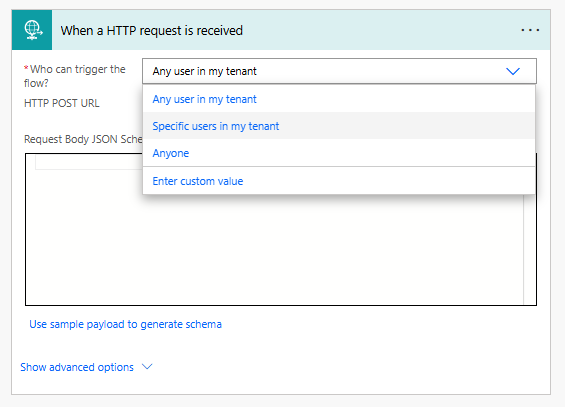
I had a couple of flows where this option was set to Any user in my tenant, but that was causing the URL to be different than when set to Anyone. Below you can see the two URLs compared. The first one is the Any User in my tenant, which does not generate the last bit of the URL, including the SIG. The SIG is a SAS token generated by the platform. When changing the setting to Anyone, it does generate, and when pasting that URL in the environment variable, the Power Automate Flow is triggered again.

Also, when I tried to create new flows, this defaulted to Any user in my tenant, which was putting me in the wrong direction when investigating this. Microsoft has documentation that explains the differences between the three options here.

Credit to my colleague Raghu Chalasani for helping sort this out 🏆

Power Automate http trigger urlribbon work benchXRMToolbox

Post navigation

Previous post
Next post

Related Posts

Agents AI Agent Johan enters the knockout stage

AI Agent Johan enters the knockout stage: Netherlands vs. Morocco — no second chances

Posted on June 29, 2026June 29, 2026

The group stage is done. The Netherlands finished first in their group and Morocco came through in second behind Brazil. Now it gets serious — one game, no second chances. AI Agent Johan enters the knockout stage and he has his prediction ready. This blog post covers three things: The…

Read More
Sales

Make Sales Fun again, How to configure your own Gamification

Posted on December 10, 2025December 10, 2025

Making sales fun again and driving adoption, that was, in essence, what the gamification module was all about. Some of you can perhaps still remember the classic gamification module. Now it is time to configure your own gamification via some simple customizations. In this blog, I would like to demonstrate…

Read More
Agents Meet AI Agent Johan

Can AI Agent Johan 🤖 predict if the Netherlands 🐯 will win the 2026 World Cup Soccer ⚽?

Posted on May 27, 2026May 27, 2026

Meet AI Agent Johan 🤖 , the star of this year’s World Cup Soccer 2026 prediction series ⚽. Some of you who followed my blog during Euro 2024 might remember the series where I used an AI Builder prediction model to predict how the Netherlands would perform during that tournament…

Read More

Comment

  1. Pingback: Trigger HTTP Flows From Dataverse Using Environment Variables And The Modern Command Bar - 365 Community Online

Leave a Reply Cancel reply

Your email address will not be published. Required fields are marked *

ABOUT ME

  • LinkedIn
  • Mail
  • GitHub
  • YouTube
"BizApps and PowerPlatform dude with a passion for AI, sitting relaxt in his black shirt on a bounty white beach with palm trees, a azure blue ocean in the background and enjoying a good coffee "

~GenAI - DALL.E 3 and GPT 3.5

Subscribe

Please wait...

Thank you for subscribing!

Search

Categories

  • Agents
  • AI Builder
  • AI Prompting
  • Artificial Intelligence
  • Copilot
  • Copilot Studio
  • Customer Insights
  • Customer Service
  • Dataverse
  • Field Services
  • Generative AI
  • Model-driven Apps
  • Personal Development
  • Power Apps
  • Power Automate
  • Power BI
  • Power Platform
  • Reporting
  • Sales
  • SharePoint

Archive

  • July 2026
  • June 2026
  • May 2026
  • March 2026
  • February 2026
  • January 2026
  • December 2025
  • November 2025
  • October 2025
  • August 2025
  • July 2025
  • June 2025
  • May 2025
  • April 2025
  • March 2025
  • February 2025
  • January 2025
  • December 2024
  • November 2024
  • October 2024
  • September 2024
  • August 2024
  • July 2024
  • June 2024
  • May 2024
© 2024 - All rights reserved | Jeroen Scheper | Privacy Policy