Skip to content
JScheper.com
JScheper.com

BizApps, Powerplatform and AI

  • Home
  • Blog
  • Contact
JScheper.com

BizApps, Powerplatform and AI

hide system views

Hide system views to tailor your user experience

Posted on September 11, 2024September 6, 2024 By Jeroen Scheper

Do you find it difficult to find the system views in the long lists of views available for certain tables? Yes, you were able to set a default of course, but now you do have the option to hide system views when enabling this feature.

When looking at the Opportunity table in the standard Sales Hub App, and of course we are now logged in as an Administrator so we would see all of them, but as you can see there are a lot (24 😅). Imagine adding custom views that would make the list even a lot longer.
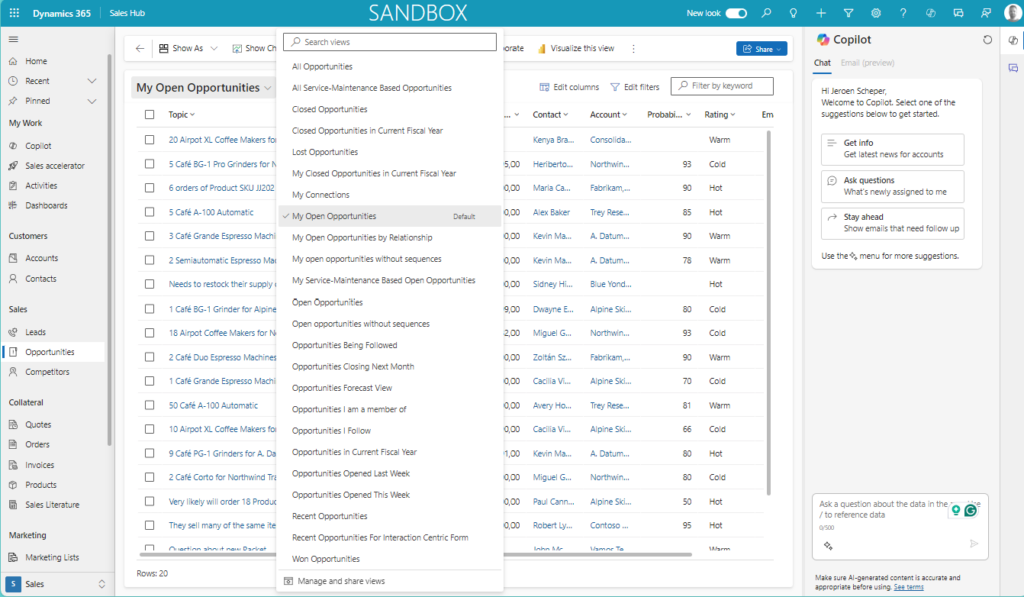
hide system views

Even if you build model-driven apps you can configure the experience as an administrator by deciding what you want to add to the app, for example, menu items, forms, and views. Since most likely this is a model-driven app that will be used on a bigger scale, the experience will be the same for the colleagues who have access to the app. Also then, having the ability to hide system views can be a great feature to enable in order to improve the customer experience.

How do you configure the “hide system views” feature?

In order to enable the “Hide system views” feature, please follow the next steps:

  • Open the Power Platform Admin Center
  • Navigate to Environments
  • Select the environment where you want to enable this for
  • Select Settings
  • Navigate to Features in the Products section
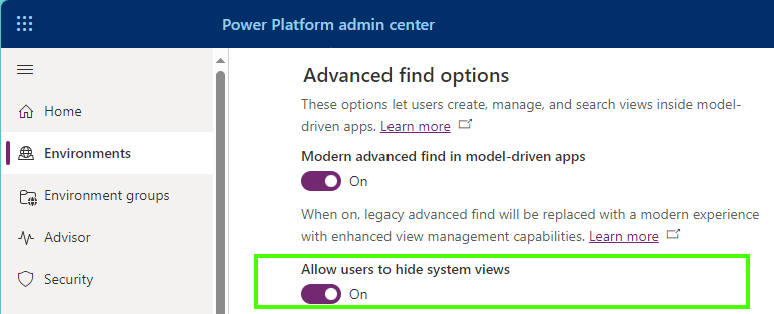
  • Within the Advanced find options enable the Allow users to hide system views feature
  • Press Save

How does hide system views work?

When you want to maintain the system views for a certain table you can follow the next steps:

  • Open the dropdown of views for a certain table
  • Select Manage and share views at the bottom of the list
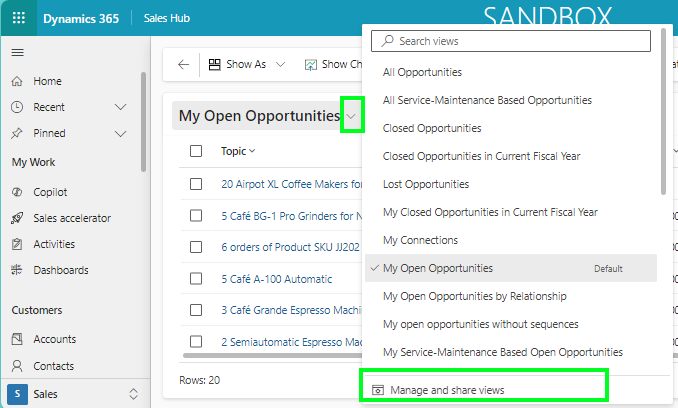
  • Select the view you would like to hide
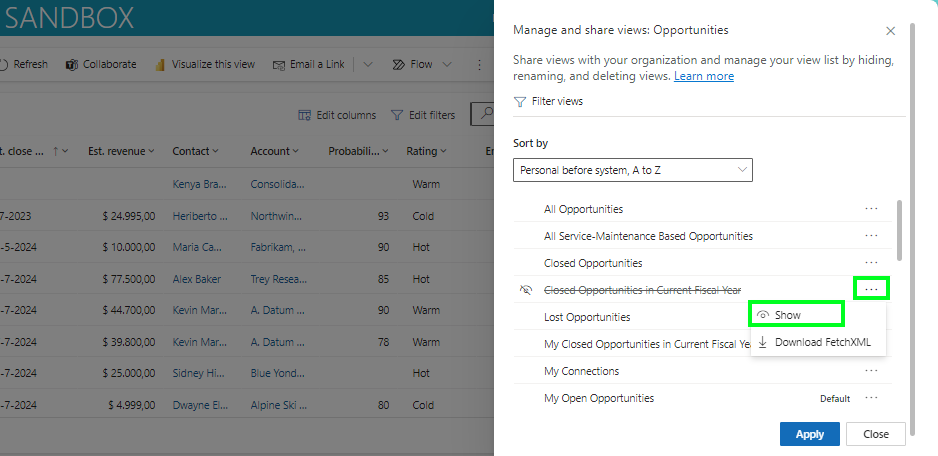
  • Select the three dots > Hide

Show the view

It is also very easy to make a view available again by unhiding the view

  • Select the view you would like to hide
  • Select the three dots > Show
Model-driven Apps Customer Insights Customer Service Field Services Sales Hide system viewsManage views

Post navigation

Previous post
Next post

Related Posts

AI Prompting Using AI Prompting column

Enhance your data using AI Prompt columns

Posted on July 30, 2025July 30, 2025

This is still in preview, but something that I was waiting for to be introduced for a while: using AI Prompt columns in your tables. In this blog, I will demonstrate two use cases and how to create your own: AI Prompting for SWOT Analysis When you work in sales,…

Read More
Model-driven Apps how to configure help

Help, how to configure help feature?

Posted on February 19, 2025February 19, 2025

Have you ever pressed the ? button in the main ribbon? When you are new to Dynamics 365 you have perhaps clicked on this to check the documentation or when you already work day in and day out with it, perhaps you clicked on this accidentally because you were too…

Read More
Copilot the form fill assist toolbar

Copilot’s new form fill assist toolbar including the support of files

Posted on May 8, 2025May 8, 2025

Still in preview, but looks very promising, the form fill assist toolbar, which also allows you to use files now. This is an extension of something that I wrote about before a while back, when the Copilot smart paste feature was introduced (blog here). At this stage, the new toolbar…

Read More

Leave a Reply Cancel reply

Your email address will not be published. Required fields are marked *

ABOUT ME

  • LinkedIn
  • Mail
  • GitHub
  • YouTube
"BizApps and PowerPlatform dude with a passion for AI, sitting relaxt in his black shirt on a bounty white beach with palm trees, a azure blue ocean in the background and enjoying a good coffee "

~GenAI - DALL.E 3 and GPT 3.5

Subscribe

Please wait...

Thank you for subscribing!

Search

Categories

  • Agents
  • AI Builder
  • AI Prompting
  • Artificial Intelligence
  • Copilot
  • Copilot Studio
  • Customer Insights
  • Customer Service
  • Dataverse
  • Field Services
  • Generative AI
  • Model-driven Apps
  • Personal Development
  • Power Apps
  • Power Automate
  • Power BI
  • Power Platform
  • Reporting
  • Sales
  • SharePoint

Archive

  • September 2026
  • July 2026
  • June 2026
  • May 2026
  • March 2026
  • February 2026
  • January 2026
  • December 2025
  • November 2025
  • October 2025
  • August 2025
  • July 2025
  • June 2025
  • May 2025
  • April 2025
  • March 2025
  • February 2025
  • January 2025
  • December 2024
  • November 2024
  • October 2024
  • September 2024
  • August 2024
  • July 2024
  • June 2024
  • May 2024
© 2024 - All rights reserved | Jeroen Scheper | Privacy Policy