Stay Connected and Informed, How can you achieve this? “Can I get an email notification when I get a lead?” or “How about if I get an alert when that Work Order is assigned to me”? These are only a few of the questions that I get a lot in different contexts. Personally speaking, I am getting overwhelmed when it comes to email notifications triggered by events. I got to the point where I archive these straight away because there are just too many to read and most of them are not relevant.
Now I know that there are functionalities in Dynamics 365 or Power Platform that can do part of these notifications, think about within the Assistant you have Insight Cards that can notify you when certain events take place. But different people have different opinions, which also means different channels on how people would like to stay connected and informed. This is where the idea of the Personal Notification Hub was born.

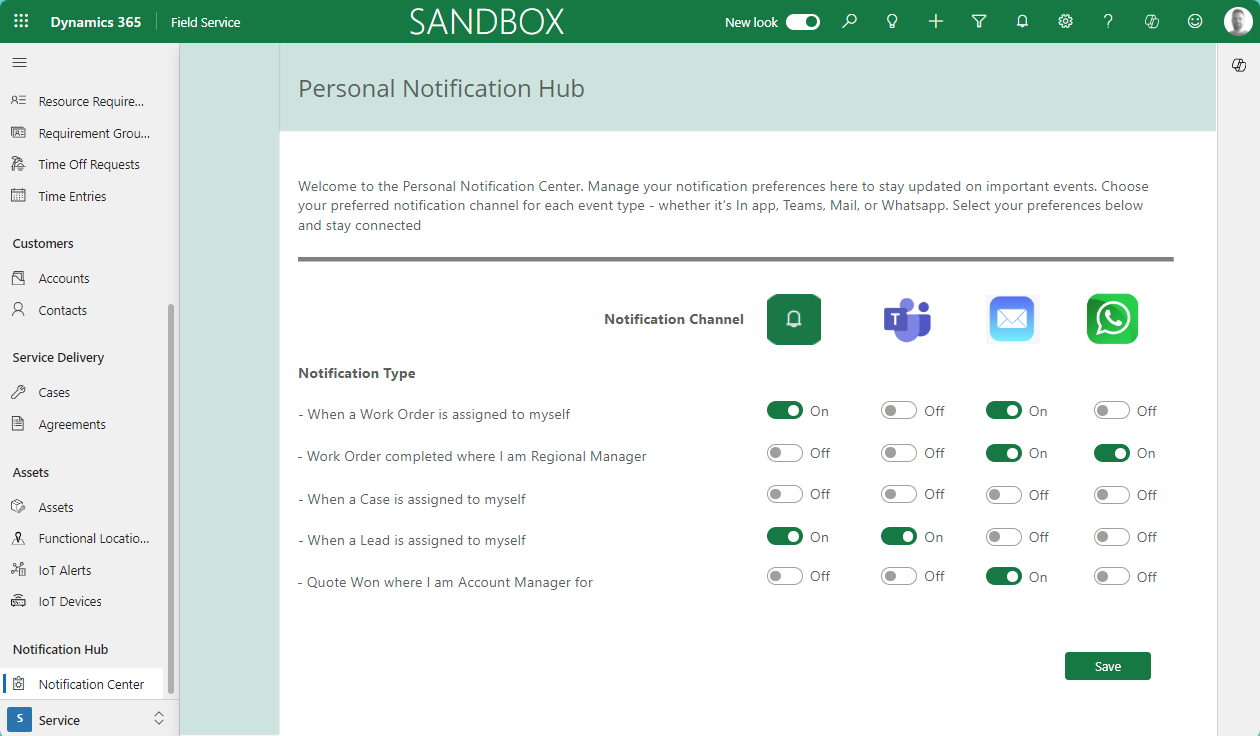
The idea is simple, there are predefined Notification Types or events that are managed by potentially an IT Department. For each of these Notification Types users can via which channel they want to stay connected and informed.
How to build your own Personal Notification Hub
To build your own Notification Hub to stay connected and informed, you need a custom page where you will be managing the preferences for each of the notification types and the channels you would like to facilitate. In this example, I have added WhatsApp, since it is a popular way of receiving notifications. Unfortunately, I do not have that connector available to myself but I thought it would be valuable to add it.
In our scenario, I have added a custom page to the menu of my App and added the preferences for each of the channels as Yes/No fields on the User table. This is not very scalable of course, so ideally you would move these fields to a separate table.
Notification Types – Power Automate Flow
Depending on the Notification Types you would like to offer, you perhaps need different types of Flows to support this. In our case, we need an Instant flow that is triggered when the Owner of a Work Order has changed.

For each of the channels that you would like to support there will be a Parallel Branche where you will check if the setting for that channel is turned on.
Model-Driven In-App Notification
In order to create an Model-Driven In-App notification within Dynamics you need to create a record in the Appnotifications table. The IconType will determine what kind of icon you want to use in your notification, you have options like: Success, Failure, Warning, Info, or go for a custom icon.

In our scenario, the Info icon is used. You can access the notifications by clicking on the Bell icon at the ribbon of the application. To make this user-friendly we added the link to the work order in the notification.

Teams Notification
In order to create a notification in Teams we can use the Teams Connector – Post Message in a Chat. Also here you have the option to customize the whole message and put in more details if you wish.

This will result in a chat message in your Teams application. The one thing I really don’t like is that I can’t control the “Sender” of the message, in our case Workflows. It would be super slick if somehow we could control the name of the “Sender”. If anyone has any thoughts on this then please leave a comment behind.

Email Notification
To receive an email notification you can use Office 365 Outlook – Send an email connector. Also in this connector, you can customize the message.

Also in this step the link of the record to the Work Order is included, so you can access it straight from your email.

so to conclude, if you want to stay connected and informed, a Personal Notification channel can be a great idea to accomplish this.



Love this! Great way for someone to control the type of communications they get, based on what they prefer. Really nice solution Jeroen!
This is fabulous with great detail + explanations!