Skip to content
JScheper.com
JScheper.com

BizApps, Powerplatform and AI

  • Home
  • Blog
  • Contact
JScheper.com

BizApps, Powerplatform and AI

AIBuilder, Sentiment Analysis,PowerAutomate

Using AI Sentiment to Prioritize Your Cases

Posted on May 1, 2024July 17, 2024 By Jeroen Scheper

Have you thought about using AI Sentiment Model to determine the priority of cases assigned to yourself? In Power Automate there is a prebuilt model that can perform a sentiment analysis on text. The model is called: Analyze positive or negative sentiment in text. This can be very handy action in determining if a certain text is either Positive, Negative or Neutral. In the world of business applications there are plenty of use cases where you can apply this, for example for analyzing incoming emails or posts on social media. I wanted to experiment my self with this functionality and came up with the following case:

On a helpdesk of a company that sells mobile phones and equipment they receive all kinds of requests, think about:

  • questions from existing clients about products
  • requests for repairs
  • questions that could be answered by guides

There are lots of ways to determine what the right priority would be of handling these requests, that could be either First In First Out, an Entitlements, Rules around priority or perhaps other specific logic determined by the business. In this case we want to manage this on sentiment and in this specific case the Negative will have the highest priority.

In order to accomplish this, I have created a PowerAutomate Flow which will analyze the Case Description field as soon as the Case is created. You need to provide the case description and the language (in our case (en-us) to the model in order to determine the sentiment.

PowerAutomate Flow using AI Sentiment connector
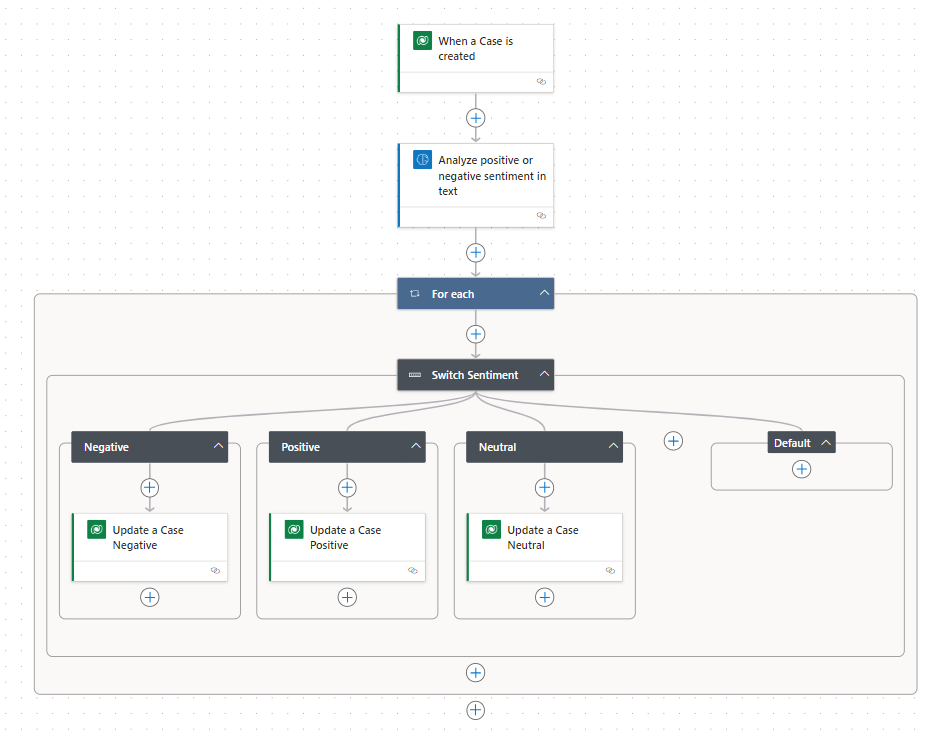
In the Update actions, we will set the Sentiment as well as the score. The score is a value in the range of 0 to 1. Closer to the 1 indicates greater confidence that the determined sentiment is more accurate.

In order to create a view and being able to sort on the emoji (sentiment) I have created a calculated field that would add a sorting value to the record.
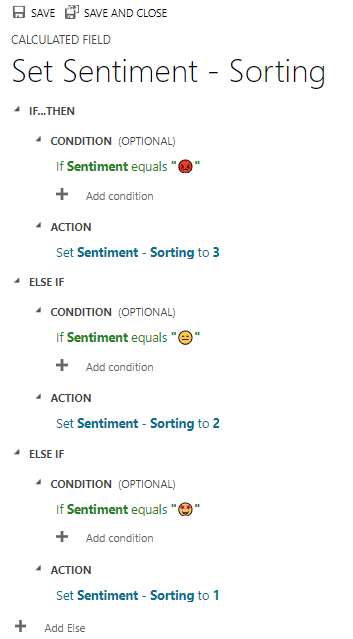
If you would now create a view that would show Cases based on Sentiment and then Sentiment Score, the ones one top of the list are the most Negative ones and should be picked up first.
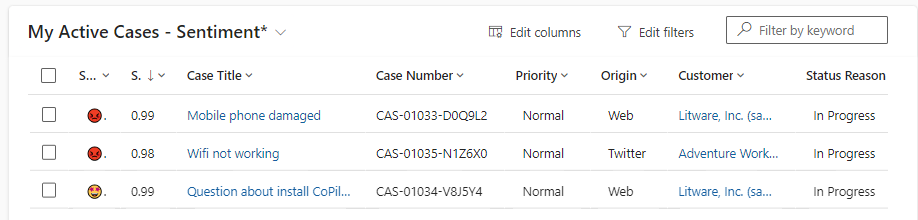
I know that this is probably not the ideal situation for determining priority of cases, but I hope you found the article valuable.

Before you implement this to your own business, or similar logic, it would be good to check if your language (the text you want to analyze) is supported by the model.


AI Builder Artificial Intelligence Customer Service AI SentimentPower Automate

Post navigation

Next post

Related Posts

Sales multi-table visual hierarchy

Cockpit view with the multi-table visual hierarchy

Posted on January 19, 2026January 19, 2026

A while back, I posted about the new visual hierarchy that became available (link here). This feature is now extended, which allows you to create your own multi-table visual hierarchy 😍. Personally speaking, I love this feature since it is a great and organized visual representation of the data. In…

Read More
Sales New customized lead qualification experience

New customized lead qualification experience

Posted on August 21, 2024August 21, 2024

One of my favorite new features that is introduced in the Wave 2 2024 release, is the new customized lead qualification experience. This functionality did not change that much over time but now you do have better options to make this process a lot smoother and tailored to your needs….

Read More
Copilot Copilot smart paste feature

Increase efficiency with Copilot smart paste feature

Posted on November 28, 2024December 4, 2024

Copilot features are being launched rapidly lately. Sometimes in preview and sometimes they are available to you straight away. A while back Microsoft introduced the Copilot form fill suggestions using AI. I blogged about it when it was just released (blog post you can find here) and at that time…

Read More

Comments (2)

  1. Raghu Chalasani says:
    May 1, 2024 at 10:36 am

    Nice one Jeroen

    Reply
  2. Megan Walker says:
    May 1, 2024 at 11:07 am

    I love the use of Emojis 😉 – I think having a visual indicator can definitely help people quickly see what is going on with the records they own, or need to manage in some way. Love it!

    Reply

Leave a Reply Cancel reply

Your email address will not be published. Required fields are marked *

ABOUT ME

  • LinkedIn
  • Mail
  • GitHub
  • YouTube
"BizApps and PowerPlatform dude with a passion for AI, sitting relaxt in his black shirt on a bounty white beach with palm trees, a azure blue ocean in the background and enjoying a good coffee "

~GenAI - DALL.E 3 and GPT 3.5

Subscribe

Please wait...

Thank you for subscribing!

Search

Categories

  • Agents
  • AI Builder
  • AI Prompting
  • Artificial Intelligence
  • Copilot
  • Copilot Studio
  • Customer Insights
  • Customer Service
  • Dataverse
  • Field Services
  • Generative AI
  • Model-driven Apps
  • Personal Development
  • Power Apps
  • Power Automate
  • Power BI
  • Power Platform
  • Reporting
  • Sales
  • SharePoint

Archive

  • July 2026
  • June 2026
  • May 2026
  • March 2026
  • February 2026
  • January 2026
  • December 2025
  • November 2025
  • October 2025
  • August 2025
  • July 2025
  • June 2025
  • May 2025
  • April 2025
  • March 2025
  • February 2025
  • January 2025
  • December 2024
  • November 2024
  • October 2024
  • September 2024
  • August 2024
  • July 2024
  • June 2024
  • May 2024
© 2024 - All rights reserved | Jeroen Scheper | Privacy Policy