
Skip to content
JScheper.com
JScheper.com

BizApps, Powerplatform and AI

  • Home
  • Blog
  • Contact
JScheper.com

BizApps, Powerplatform and AI

Flow supporting Version History

Power Automate Flow supporting Version History

Posted on May 15, 2024May 16, 2024 By Jeroen Scheper

Not so long ago Microsoft released a feature within Power Automate Flow supporting Version History. This allows makers to work according to the concept of a “draft / publish” model for Flows. Because of this, it is now also possible to restore to a previous version which can be a massive benefit when dealing with big and complex flows, Microsoft Thank you 🙂

The other thing I like about Power Automate Flow supporting Version History is that it will be so much easier to compare different versions of your flow, which increases efficiency if you ask me.

When building a flow within a solution, you will now have the option in the ribbon called Version History. This will open the side panel where you can find the history of actions to your flow.
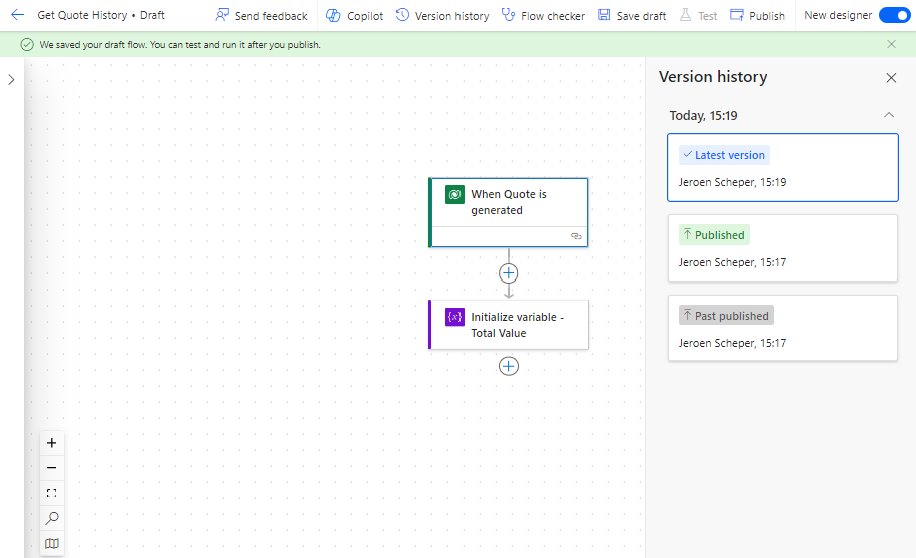
Flow supporting Version History


If you decide to make additional changes to your Flow and save this as a draft by selecting Save as Draft, new entries will be created in the version history.
In the example below I decided to extend the flow with a condition statement and Publish the flow again. Publishing is an important step because otherwise, changes will not have any effect when you execute the flow.

The cool thing is that now, when you click on the previous version (marked below) the flow will show that specific version on the left. On top of that, in the upper right corner, there is now an option available to Restore to that version.

When you decide to Restore, a final confirmation popup will be shown to check if you are sure.
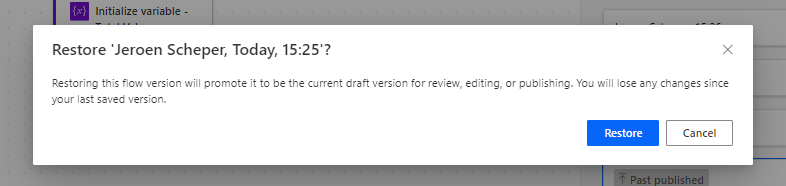
Once confirmed, the latest published version will now be the version you decided to restore to.

So to conclude, for me having Power Automate Flow supporting Version History is a great enhancement, especially when working with complex flows.


Power Automate FlowPower AutomateVersion History

Post navigation

Previous post
Next post

Related Posts

Power Automate workflow approvals using power automate

Get your quote approved with workflow approvals using Power Automate

Posted on October 16, 2024October 11, 2024

Inspired by a number of great people in the community who wrote about Workflow Approvals using Power Automate in the past I wanted to use this in a prototype based on requests that I have seen in the field. This idea is translated into the use case I have used…

Read More
Copilot Studio bring johan to life in Copilot Studio

Bringing AI Agent Johan in Copilot Studio to life🤖

Posted on June 5, 2026June 5, 2026

The data is done. The model is trained. Now it is time to bring AI Agent Johan in Copilot Studio to life. In the previous posts I covered why the 2024 model was limited and how I rebuilt the data layer from scratch with 7,666 training rows across 182 nations….

Read More
AI Builder AI Builder prediction

AI Predicts an epic game against France

Posted on June 20, 2024July 17, 2024

This will be a clash between two big soccer nations for sure. Before I go to the AI Builder prediction model I would like to share some interesting facts: Before I go to the prediction, a couple of things to share beforehand. The whole configuration of the table, preparation of…

Read More

Leave a Reply Cancel reply

Your email address will not be published. Required fields are marked *

ABOUT ME

  • LinkedIn
  • Mail
  • GitHub
  • YouTube
"BizApps and PowerPlatform dude with a passion for AI, sitting relaxt in his black shirt on a bounty white beach with palm trees, a azure blue ocean in the background and enjoying a good coffee "

~GenAI - DALL.E 3 and GPT 3.5

Subscribe

Please wait...

Thank you for subscribing!

Search

Categories

  • Agents
  • AI Builder
  • AI Prompting
  • Artificial Intelligence
  • Copilot
  • Copilot Studio
  • Customer Insights
  • Customer Service
  • Dataverse
  • Field Services
  • Generative AI
  • Model-driven Apps
  • Personal Development
  • Power Apps
  • Power Automate
  • Power BI
  • Power Platform
  • Reporting
  • Sales
  • SharePoint

Archive

  • July 2026
  • June 2026
  • May 2026
  • March 2026
  • February 2026
  • January 2026
  • December 2025
  • November 2025
  • October 2025
  • August 2025
  • July 2025
  • June 2025
  • May 2025
  • April 2025
  • March 2025
  • February 2025
  • January 2025
  • December 2024
  • November 2024
  • October 2024
  • September 2024
  • August 2024
  • July 2024
  • June 2024
  • May 2024
© 2024 - All rights reserved | Jeroen Scheper | Privacy Policy